

YouTube Global Controls
3 ratings
)
Overview
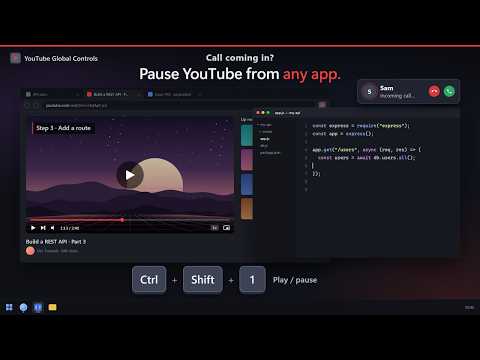
Global YouTube shortcuts: play/pause, next/previous, seek, mute, volume, speed and Picture-in-Picture. Pins the tab while playing.
Control YouTube without leaving what you're doing. YouTube Global Controls adds four keyboard shortcuts that work anywhere in Chrome — and, because they are registered as global shortcuts, even while Chrome is in the background and you are working in another application. SHORTCUTS Ctrl+Shift+Space Play / pause Ctrl+Shift+U Toggle Picture-in-Picture Ctrl+Shift+Left Skip back 10 seconds Ctrl+Shift+Right Skip forward 10 seconds All four can be reassigned at chrome://extensions/shortcuts if they clash with something else you use. HOW IT WORKS The extension finds your open YouTube tab automatically — it does not need to be focused, visible, or even in the current window. If several YouTube tabs are open, it prefers the most recently used video page. While a video is playing the tab is pinned, so it stays put and is easy to find. Pause it and the tab unpins itself. This applies only to watch and Shorts pages, so browsing the homepage will not pin anything. Press a shortcut with no YouTube tab open and a notification tells you so; clicking it opens YouTube. PRIVACY No data is collected, stored, or transmitted. No analytics, no accounts, no external servers. The extension requests access only to youtube.com, and all of its code runs locally in your browser. Open source, MIT licensed: https://github.com/Mousta-Med/YT-Extension
5 out of 53 ratings
Details
- Version1.1.0
- UpdatedOctober 14, 2026
- Offered bymoustamuhammed
- Size20.22KiB
- LanguagesEnglish
- Developer
Email
moustamuhammed@gmail.com - Non-traderThis developer has not identified itself as a trader. For consumers in the European Union, please note that consumer rights do not apply to contracts between you and this developer.
Privacy

This developer declares that your data is
- Not being sold to third parties, outside of the approved use cases
- Not being used or transferred for purposes that are unrelated to the item's core functionality
- Not being used or transferred to determine creditworthiness or for lending purposes
Support
For help with questions, suggestions, or problems, please open this page on your desktop browser