

GIF Vault: Save, Organize & Back Up GIFs

Overview
Import media from supported links and files. Convert supported MP4/WebM videos to GIFs, organize your vault, and back it up.
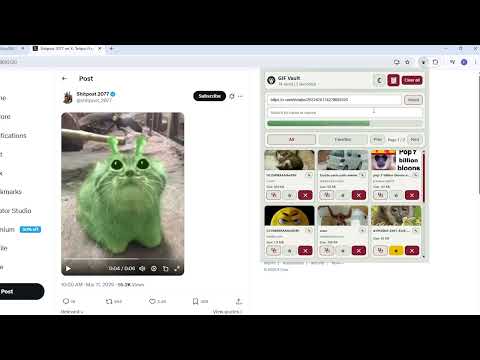
Save GIFs, images, and supported MP4/WebM videos from the web or your computer. GIF Vault keeps your collection in a vault stored locally in your browser, ready to search, reuse, back up, and restore. IMPORT IN SEVERAL WAYS - Right-click a GIF, image, or supported video on the web. - Paste supported image, video, media, or X post URLs. - Choose local files or drag and drop them into the import page. - Import URL lists, text files, and multiple media files in bulk. - Convert supported MP4 and WebM videos to GIFs automatically. - Follow import progress and stop an active import when needed. ORGANIZE YOUR VAULT - Search by item name or source link. - Mark favorites for quick access. - Rename, copy, delete, or clear saved items. - Select multiple items for faster cleanup. - Browse a clean, paginated gallery. BACK UP AND RESTORE Download a backup file of your saved media. Restore it later or in another browser profile. Restoring merges items into the current vault, skips duplicates, and does not clear existing items. LOCAL STORAGE AND CONTROL Your saved media is stored locally in this browser using browser storage. No account is required. When you choose to import from a supported URL, GIF Vault guides you through granting any required site access. CUSTOMIZE YOUR EXPERIENCE Adjust GIF conversion quality, output width, color count, GIF download-size limit, default tab, page size, and hover previews. Choose English or Turkish and use a light or dark theme. NOTES - Clearing this browser's site data may remove saved items, so keep a backup of important media. - Some protected or private media may not be available to import. - Video conversion can use noticeable CPU and memory on lower-end devices.
0 out of 5No ratings
Details
- Version1.7.1
- UpdatedJuly 26, 2026
- Offered byFurkan Göçük
- Size10.64MiB
- Languages2 languages
- Developer
Email
furkangocuk42@gmail.com - Non-traderThis developer has not identified itself as a trader. For consumers in the European Union, please note that consumer rights do not apply to contracts between you and this developer.
Privacy

GIF Vault: Save, Organize & Back Up GIFs has disclosed the following information regarding the collection and usage of your data. More detailed information can be found in the developer's privacy policy.
GIF Vault: Save, Organize & Back Up GIFs handles the following:
This developer declares that your data is
- Not being sold to third parties, outside of the approved use cases
- Not being used or transferred for purposes that are unrelated to the item's core functionality
- Not being used or transferred to determine creditworthiness or for lending purposes