

Google Keep - Full Screen Edit

Kopsavilkums
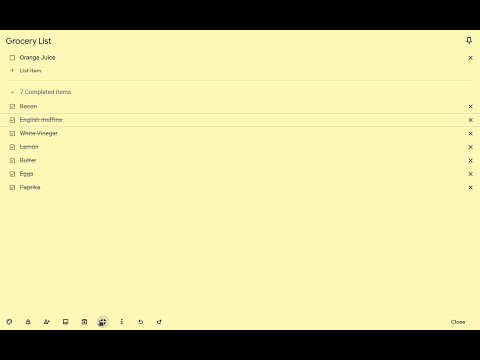
Makes note editing take up the full browser window
VERSION 1.4.1 --------------------------------------------------------------------------------------------------- * Allows Google Keep editing to use the full browser window. * Allows toggling full screen on and off by clicking on an icon added on the notes. * Remembers full screen status across sessions * Supports Dark Mode * Works with non-English language settings * Options page to customize behavior (width, padding, background) * Customizable keyboard shortcut (Ctrl+Shift+F or Cmd+Shift+F by default) to toggle full screen on and off * 🆕 Options allow fading out extra note items (menu, labels, etc) for even more distraction-free work and focus on the note content * 🆕 Options allow customizing horizontal and vertical padding separately * 🆕 Improved padding styling that works with labels, previews, etc. * 🆕 Icons to help identify options View Demo Here: https://cmp.onl/tjqC WARNINGS & IMPORTANT NOTES * **Use this extension at your own risk.** It shouldn't cause problems, but I can't make any guarantees. It's wise to keep critical notes [backed up](https://support.google.com/keep/answer/10017039?hl=en). * **This extension only works with the website version** of Google Keep (ie. https://keep.google.com) - it won't work with the "app" version (the one you might install and launch from your app menu -ie. for offline use). * At this time, clicking the extension icon itself does not toggle anything - click the full-screen icon added to the note itself (or use the keyboard shortcut) to toggle full-screen on and off. INSTRUCTIONS * Full-screen is enabled by default when you first install the extension. * Use the full-screen icon at the bottom of the note to toggle full-screen on and off as needed. * Alternatively, use the keyboard shortcut, which you can customize at "chrome://extensions/shortcuts" * Your selection will be remembered between notes and sessions. * Open the extension options (from a note menu, Keep menu, extension icon menu or extension page) to customize behavior. Like the Extension? Rate or review it here to help others find it: https://cmp.onl/tnEd Found a bug? Have a suggestion? Submit it here: https://cmp.onl/tngy Source Code: https://github.com/chrisputnam9/chrome-google-keep-full-screen Thanks to all who have contributed reviews, suggestions, bug reports, etc. Special thanks to @MartinLichtblau, @tbrodbeck, @JnLlnd, @dylankenneally, @Paliec, @macdonaldster, @kellerbeing, @Palivec Developer sustenance funding ($ support) is welcome * https://ko-fi.com/chrisputnam9 * https://github.com/sponsors/chrisputnam9
4,6 no 587 vērtējumi
Detalizēta informācija
- Versija1.4.1
- Atjaunināts2025. gada 16. aprīlis
- Lielums159KiB
- ValodasEnglish
- Izstrādātājsvietne
E-pasts
chrisputnam9@gmail.com - Neesmu komersantsŠis izstrādātājs nav norādījis, ka būtu tirgotājs. Patērētāji Eiropas Savienībā, lūdzu, ņemiet vērā, ka uz līgumiem starp jums un šo izstrādātāju var neattiekties patērētāju tiesības.
Konfidencialitāte
Šis izstrādātājs apgalvo, ka jūsu dati:
- Netiek pārdoti trešajām pusēm, izņemot apstiprinātos lietošanas gadījumus.
- netiek izmantoti vai pārsūtīti ar tādu mērķi, kas nav saistīts ar preces pamatfunkcijām;
- netiek izmantoti vai pārsūtīti, lai noteiktu kredītspēju vai pieņemtu vai palīdzētu pieņemt lēmumus par aizdevumiem.
Atbalsts
Lai uzdotu jautājumus, iesniegtu ieteikumus vai saņemtu palīdzību problēmu novēršanā, lūdzu, atveriet šo lapu datora pārlūkā.