

TalkType: Unlimited Free Dictation in Any Text Box

Overview
Press a hotkey and speak into any text box. Free, unlimited dictation with voice punctuation, 70+ languages and no account.
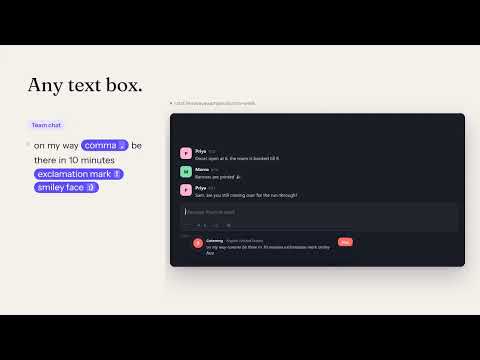
Write emails, chats, documents and forms by voice, without a daily cap, a paywall or upsell pop-ups. TalkType uses the speech recognition built into Google Chrome. Click into any text box, press Alt+Shift+D (or click the toolbar button) and start talking. Your words are typed at the cursor, just as if you had typed them yourself. You can dictate for as long as you like: TalkType quietly restarts Chrome's recogniser whenever it times out, so a long email or essay is never cut off. Built for people who rely on their voice: people with RSI or dyslexia, students, writers, support agents and anyone who thinks faster than they type. WHAT YOU GET - Works in regular text fields, text areas and rich editors (contenteditable), including Gmail, Google Docs, chat apps, CRMs and web forms - A global hotkey (Alt+Shift+D by default, changeable) to start and stop - Voice punctuation: say "comma", "period", "question mark", "new line", "new paragraph", "open quote" and more - Editing commands: "scratch that" removes the last phrase, "stop listening" turns the mic off - Custom phrases: say "my email" or "sign off" and TalkType types your saved text - Automatic sentence capitalisation and smart spacing around punctuation - 70+ dictation languages and regional accents - A small floating bar shows what Chrome is hearing while you speak, plus a Stop button - If no text box is selected, your words are kept in the bar so you can copy them - Optional auto-stop after a period of silence, and optional start and stop sounds - A practice area and a phrase tester on the settings page PRIVATE BY DESIGN TalkType has no servers, no account, no ads and no analytics. It only runs on a tab when you press the shortcut or click its button. It does not ask to read every website. Speech is turned into text by Chrome's own speech service, which Google operates. FREE, FOR REAL Every feature is free, and there is no daily limit. If TalkType helps you, a review on the Chrome Web Store helps more people find it.
0 out of 5No ratings
Details
- Version1.0.2
- UpdatedNovember 6, 2026
- Offered byNisreen Maher
- Size51.1KiB
- LanguagesEnglish
- Developer
Email
mohelm97@gmail.com - Non-traderThis developer has not identified itself as a trader. For consumers in the European Union, please note that consumer rights do not apply to contracts between you and this developer.
Privacy

This developer declares that your data is
- Not being sold to third parties, outside of the approved use cases
- Not being used or transferred for purposes that are unrelated to the item's core functionality
- Not being used or transferred to determine creditworthiness or for lending purposes
Support
For help with questions, suggestions, or problems, please open this page on your desktop browser