


Overview
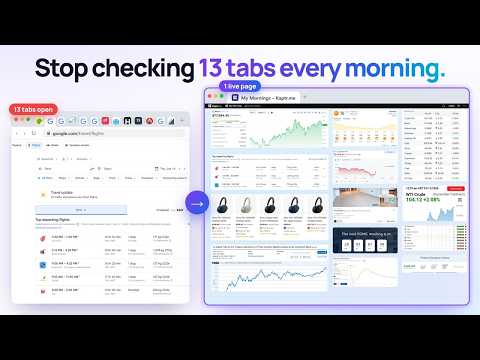
AI screenshot extension: capture any part of a page, even behind a login, and keep it up to date on one live dashboard.
Kaptr.me is an AI screenshot extension. Take a screenshot of any part of a web page, even behind your login, and keep it on one live dashboard that you refresh in one click. Ten tabs every morning, or one page. A normal screenshot is frozen the moment you take it. A Kaptr.me snapshot remembers its page: one click brings it up to date from the source. Put the numbers, pages and tools you check every day on your Kapboard, your live dashboard, and read it in seconds. See it. Kaptr it. Keep it current. ━━ SCREENSHOT ANY PAGE ━━ • 4 capture modes: select an area, pick an element (a chart, a table, a price), the visible page, or a full page screenshot of long scrolling pages. • Keyboard shortcut: Ctrl+Shift+K (Cmd+Shift+K on Mac). • Copy to the clipboard and paste into an email, a chat or a document; download as PNG, JPG, WebP or PDF; share a link; or save to a Kapboard. • Works on pages behind your login: the capture happens in your own browser, with your own session. • No account needed for a quick screenshot. ━━ KEEP IT UP TO DATE ━━ • Refresh All updates your whole Kapboard in one click, on every plan, Free included. • Automatic refresh while your Kapboard is open (Starter and up). • AI snapshots also refresh in the cloud, even when the Kapboard is closed (Pro and Business). • Version history with a before/after view (Starter and up), and an optional daily summary of what changed. ━━ UNDERSTAND IT WITH KAPTR AI ━━ • Say what you want to follow in one sentence: Kaptr AI finds the pages and builds the snapshots for you. • Ask a question about a Kapboard and get an answer that cites your snapshots. • AI features use AI credits. Your first generation and your first question are free. ━━ ORGANIZE YOUR KAPBOARDS ━━ • A free canvas: drag and drop, draw, annotate, add notes and images. • Folders, favorites, search, and icons for your Kapboards (Starter and up). • No code and no setup: if it shows in your browser, it can go on your Kapboard. ━━ SHARE AND WORK TOGETHER ━━ • Private Kapboards, invitations by email, public links, and embeds in any web page that accepts an HTML block. • Your own address for a shared Kapboard: kaptr.me/yourname (Starter and up). • Export a Kapboard to PDF (Pro and Business). • Teams with real-time co-editing and shared AI credits (Pro and Business). • Also in ChatGPT (Kaptr.me app) and in Google Docs, Sheets and Slides (Kaptr.me add-on): insert live captures and refresh them all before the meeting. ━━ WHO USES KAPTR.ME ━━ • Marketing: analytics, ads and competitor prices you check every morning, on one page. • Agencies and freelancers: client reports that stay current, shared as a link instead of an attachment. • Sales: your prospect's news, share price and open roles before the call. • Finance: indexes, rates and markets side by side. • Teams: one shared Kapboard so everyone works from the same numbers, even on an office screen. • Everyday life: prices and new listings, a trip, a portfolio, your team's results. ━━ YOUR DATA ━━ • When you capture through the extension, your website logins stay in your browser. People you share a Kapboard with never see your logins. • Nothing is sent until you save a capture. Data hosted in Europe, encrypted at rest and in transit, never sold. • Optional permissions are asked only when you turn on the feature that needs them. • Some websites limit captures or refreshes: results can vary from one site to another. • Works on desktop. Kapboards can also be viewed from your phone's browser. Privacy policy: https://kaptr.me/privacy-policy/ ━━ PLANS ━━ Free plan with no credit card: 1 Kapboard, 3 snapshots, 30 AI credits a month. Starter, Pro and Business with a 7-day trial. Compare: https://kaptr.me/plans/ Questions: contact@kaptr.me °°°°°°°°°°°°°°°°°°°°° Join Us or Contact Us °°°°°°°°°°°°°°°°°°°°° Website: https://kaptr.me/ Twitter: https://x.com/KaptrMe Instagram : https://www.instagram.com/kaptr.me/ Youtube : https://www.youtube.com/@KaptrMe
4.5 out of 516 ratings
Details
- Version5.6.0
- UpdatedNovember 10, 2026
- FeaturesOffers in-app purchases
- Size408KiB
- Languages2 languages
- Developer
- Non-traderThis developer has not identified itself as a trader. For consumers in the European Union, please note that consumer rights do not apply to contracts between you and this developer.
Privacy

Kaptr.me – AI Screenshots & Live Dashboards has disclosed the following information regarding the collection and usage of your data. More detailed information can be found in the developer's privacy policy.
Kaptr.me – AI Screenshots & Live Dashboards handles the following:
This developer declares that your data is
- Not being sold to third parties, outside of the approved use cases
- Not being used or transferred for purposes that are unrelated to the item's core functionality
- Not being used or transferred to determine creditworthiness or for lending purposes
Support
For help with questions, suggestions, or problems, visit the developer's support site