Item logo image for KanbanTab — New Tab To-Do List

KanbanTab — New Tab To-Do List

kanbantab.com
Featured
4.9(

81 ratings

)
Item media 4 (screenshot) for KanbanTab — New Tab To-Do List
Item media 5 (screenshot) for KanbanTab — New Tab To-Do List
Item video thumbnail
Item media 2 (screenshot) for KanbanTab — New Tab To-Do List
Item media 3 (screenshot) for KanbanTab — New Tab To-Do List
Item media 4 (screenshot) for KanbanTab — New Tab To-Do List
Item media 5 (screenshot) for KanbanTab — New Tab To-Do List
Item video thumbnail
Item media 2 (screenshot) for KanbanTab — New Tab To-Do List
Item video thumbnail
Item media 2 (screenshot) for KanbanTab — New Tab To-Do List
Item media 3 (screenshot) for KanbanTab — New Tab To-Do List
Item media 4 (screenshot) for KanbanTab — New Tab To-Do List
Item media 5 (screenshot) for KanbanTab — New Tab To-Do List

Overview

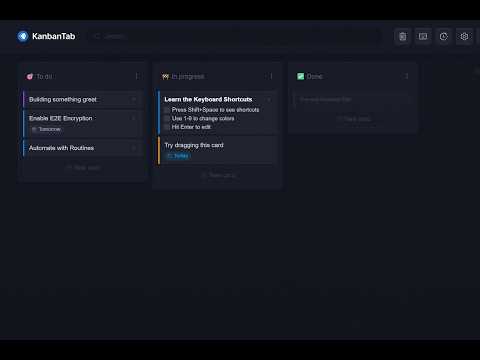
Turn your New Tab into a fast & private Kanban board

Managing your day shouldn't be a full-time job. Most productivity apps are built for teams. They are bloated with dashboards, permissions, and slow loading screens. KanbanTab is designed specifically for individuals to give you a clean space for your task management that syncs effortlessly across all your devices, without any loading screens. Speed & simplicity šŸ”µ Instant Loading: KanbanTab is engineered from the ground up for speed, meaning absolutely zero loading screens. šŸ”µ Power-User Shortcuts: Navigate, reorder, and color-code your workflow without ever touching your mouse. šŸ”µ Works Offline: Keep working without an internet connection. Changes will sync automatically when you are back online. šŸ”µ No Account Needed: Start organizing immediately without having to sign up. Powerful organization šŸ”µ Multiple Boards: Keep your work, personal life, and side projects perfectly separated. šŸ”µ Card Notes: Add detailed descriptions, links, and nested checklists to any card. šŸ”µ Automation & Routines: Set up recurring tasks or automatically clear completed items. šŸ”µ Universal Search: Find any card across all your boards and notes. Built for privacy šŸ”µ Real-Time Sync: Log in to securely sync your boards between your browser and phone. šŸ”µ End-to-End Encryption: Protect your tasks with zero-knowledge encryption directly on your device. šŸ”µ Guest Mode: Keep your data 100% local. It never leaves your device. Free to use. Zero ads. No registration required. Have questions, feature requests, or a bug report? Reach out at info@kanbantab.com or visit kanbantab.com

Details

  • Version
    3.1.0
  • Updated
    April 4, 2026
  • Features
    Offers in-app purchases
  • Size
    206KiB
  • Languages
    English
  • Developer
    Website
    Email
    woksepp.dev@gmail.com
  • Non-trader
    This developer has not identified itself as a trader. For consumers in the European Union, please note that consumer rights do not apply to contracts between you and this developer.

Privacy

Manage extensions and learn how they're being used in your organization
The developer has disclosed that it will not collect or use your data. To learn more, see the developer’s privacy policy.

This developer declares that your data is

  • Not being sold to third parties, outside of the approved use cases
  • Not being used or transferred for purposes that are unrelated to the item's core functionality
  • Not being used or transferred to determine creditworthiness or for lending purposes

Support

Related

Kanban Boards in Gmail and Google Workspace

4.4

Visual Kanban for Google Tasks & Gmail: turn emails into tasks, share boards, track with due dates, tags & comments.

nuTab

4.6

Capture your thoughts and save favorite pages in a new tab

Tabwave

4.9

A mindful productive app to replace your browser's new tab. Tasks, notes, pomodoro, bookmarks, and site blocking, all in one place.

NewTabTodo

5.0

Manage your day to day tasks by simply adding cards inside your browser's new tab

Personal Kanban - Work Beautifully in your New Tab

4.9

Turn your new tab into a kanban board that helps you focus. The only extension with multiple boards and sync across computers.

Kanban Board

4.2

Simplify task management with the Kanban board in your New Tab. Use Kanban software to manage projects and track workflows.

Kanbie

4.7

Kanban board from any tab.

Docket

4.0

Organize and Bookmark tabs, notes, and to-dos

Partizion — Tab and Session Manager

4.2

Tab & Session manager — ✨ Auto-updating tab collections, ā˜ļø Cloud synced sessions.

tabExtend - Easy Tab manager

4.6

Transform your new tab into a powerful dashboard. Add notes, set reminders, and sync across devices to boost productivity.

ClockKanban - Kanban Board (alternative to Trello)

5.0

Manage your project milestones, for free and without create an account.

My work Board

3.7

Build your own Work Board, Kanban board, Business Model Board and manage your cards

Kanban Boards in Gmail and Google Workspace

4.4

Visual Kanban for Google Tasks & Gmail: turn emails into tasks, share boards, track with due dates, tags & comments.

nuTab

4.6

Capture your thoughts and save favorite pages in a new tab

Tabwave

4.9

A mindful productive app to replace your browser's new tab. Tasks, notes, pomodoro, bookmarks, and site blocking, all in one place.

NewTabTodo

5.0

Manage your day to day tasks by simply adding cards inside your browser's new tab

Personal Kanban - Work Beautifully in your New Tab

4.9

Turn your new tab into a kanban board that helps you focus. The only extension with multiple boards and sync across computers.

Kanban Board

4.2

Simplify task management with the Kanban board in your New Tab. Use Kanban software to manage projects and track workflows.

Kanbie

4.7

Kanban board from any tab.

Docket

4.0

Organize and Bookmark tabs, notes, and to-dos

Google apps