

Kaltura Capture

Overview
Record your screen and camera, then instantly share to your Kaltura library.
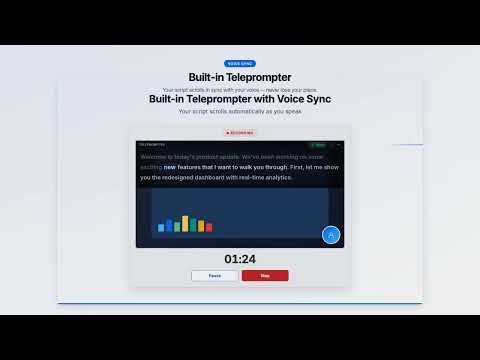
Kaltura Capture is a professional screen recording extension built by Kaltura, the enterprise video platform trusted by thousands of organizations worldwide. Record your screen, webcam, and microphone -- then upload directly to your Kaltura account in seconds. Whether you are creating training videos, recording lectures, producing product demos, or capturing presentations, Kaltura Capture gives you a complete recording studio right inside your browser. --- FOUR FLEXIBLE RECORDING MODES Choose the recording mode that fits your content: - Screen + Webcam + Mic -- Record your screen with a camera overlay and narration. Perfect for tutorials, walkthroughs, and presentations. - Screen + Mic -- Capture your screen with voiceover narration. Ideal for software demos and how-to guides. - Webcam + Mic -- Record yourself speaking directly to camera. Great for video messages, introductions, and talking-head content. - Screen Only -- Silent screen capture with no audio. Useful for capturing workflows and UI recordings. --- SIX LAYOUT OPTIONS Control exactly how your camera and screen appear in the final recording: - Picture-in-Picture -- Place your webcam circle in any of the four corners (top-left, top-right, bottom-left, bottom-right) for an unobtrusive camera overlay. - Side-by-Side -- Show your camera and screen side by side, with the camera on the left or right. Ideal for lectures and presentations where the speaker deserves equal screen presence. All layouts are composited in real time on a single-stream canvas for smooth, consistent output. --- DUAL-STREAM RECORDING Need to preserve separate video tracks for your screen and camera? Enable dual-stream recording mode for full compatibility with Kaltura Express Capture workflows. This gives your video team maximum flexibility in post-production and playback. --- STUDIO-QUALITY OUTPUT Choose the quality preset that matches your needs: - 720p -- Lightweight files, fast uploads. Great for quick internal recordings. - 1080p -- Full HD for professional-looking content. The recommended default. - 4K -- Ultra-high-definition for when every pixel matters. --- BUILT-IN TELEPROMPTER WITH VOICE SYNC Never lose your place again. Kaltura Capture includes a teleprompter that scrolls your script while you record: - AI Script Generator -- Enter a topic and let AI write a ready-to-read teleprompter script for you. - Voice Sync Mode -- The teleprompter automatically follows your spoken words in real time. It highlights the current word and dims what you have already said, so you always know exactly where you are. - Manual Scroll Speeds -- Prefer a steady pace? Choose from multiple scroll speeds (0.5x, 1x, 1.5x, 2x) instead of voice tracking. - Overlay on Recording -- The teleprompter appears directly on top of your recording preview. Collapse or expand it at any time without interrupting your recording. --- AI PRESENTATION COACH Get instant, actionable feedback on every recording -- powered by on-device AI that keeps your data completely private: - 3-Channel Analysis -- Your recordings are evaluated across three dimensions: Visual Presence (posture, eye contact, gestures, energy, framing), Voice & Delivery (tone, pace, clarity, volume, confidence), and Content & Language (pacing, filler words, vocabulary, structure, engagement). - Rating System -- Each category receives a clear rating: Strong, Good, Fair, or Needs Work, with specific observations explaining why. - Key Moments -- Timestamped highlights pinpoint exactly when something noteworthy happened, positive or negative, so you can jump to that moment in the video and review it yourself. - Top Strength & Improvement -- Every report highlights your single biggest strength and the most impactful area to improve, so you always know where to focus. - Actionable Coach Tips -- Concrete practice exercises you can try right away, like "Record yourself for 30 seconds focusing only on maintaining eye contact with the lens." - Privacy First -- All analysis runs locally via Chrome's built-in Gemini Nano. No video, audio, or transcript data ever leaves your browser. --- PROFESSIONAL RECORDING EXPERIENCE Kaltura Capture is designed to feel like a real recording studio: - Live Camera Preview -- See your webcam feed before you start recording. Check your framing, lighting, and background. - Countdown Timer -- A 3-2-1 countdown with audio beeps gives you time to prepare before recording begins. - Pause and Resume -- Need a moment? Pause your recording and pick up exactly where you left off. No need to start over. - Live Recording Preview -- Monitor your recording in real time with a running timer so you always know how long you have been recording. --- SEAMLESS KALTURA INTEGRATION Kaltura Capture is built to work hand-in-hand with your Kaltura account: - Direct Upload -- Upload recordings directly to your Kaltura media library with one click. Chunked uploads with automatic retry ensure reliability even on slower connections. - Multi-Partner Support -- Work across multiple Kaltura accounts or partner IDs without logging out and back in. - Local Download -- Prefer to save locally? Download any recording as a WebM file to your computer. - Recording History -- Access all your past recordings from the built-in history panel. Review, replay, or re-upload at any time. --- KEYBOARD SHORTCUTS FOR POWER USERS Control Kaltura Capture without touching your mouse: - Alt+Shift+K -- Open the Kaltura Capture popup - Alt+Shift+R -- Start or stop recording - Alt+Shift+P -- Pause or resume recording --- GET STARTED IN MINUTES Already have a Kaltura account? Sign in and start recording immediately. New to Kaltura? Use the built-in free signup flow to create your account and follow the getting-started onboarding to make your first recording in under two minutes. --- BUILT FOR TEAMS AND ORGANIZATIONS Kaltura Capture is built by Kaltura (NYSE: KLTR), the video experience platform powering video for leading enterprises, universities, media companies, and government agencies. Every recording you make integrates seamlessly with the Kaltura ecosystem -- including video portals, LMS integrations, live events, webinars, and video messaging.
0 out of 5No ratings
Details
- Version2.2.0
- UpdatedJune 2, 2026
- Offered byyairneumann11
- Size3.21MiB
- LanguagesEnglish
- Developer
Email
yairneumann11@gmail.com - Non-traderThis developer has not identified itself as a trader. For consumers in the European Union, please note that consumer rights do not apply to contracts between you and this developer.
Privacy

Kaltura Capture has disclosed the following information regarding the collection and usage of your data. More detailed information can be found in the developer's privacy policy.
Kaltura Capture handles the following:
This developer declares that your data is
- Not being sold to third parties, outside of the approved use cases
- Not being used or transferred for purposes that are unrelated to the item's core functionality
- Not being used or transferred to determine creditworthiness or for lending purposes