

DragApp: Gmail shared inbox

Visió general
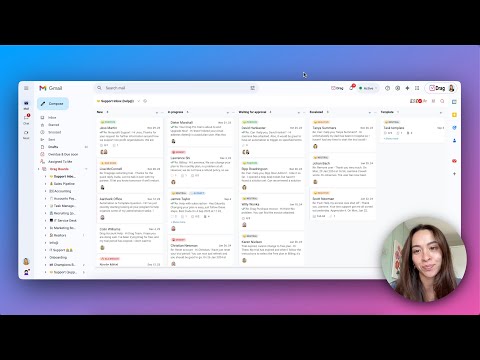
Turn Gmail into a collaboration tool for teams to manage shared inbox, Help Desk, CRM, Task Management and more from Gmail.
Bring email collaboration, workflow automation and individual productivity into your Gmail inbox. Built for Google Workspace users. ✓ Manage shared inboxes or Google Groups like support@, sales@ or info@. ✓ Use shared boards in Kanban, list or preview views to create all types of workflows in Gmail. ✓ Know who is working on what with email assignment. ✓ Collaborate with team members within the context of a specific task with internal live chat and email comments. ✓ Create automation rules for your workflows. ✓ Create custom fields to add information specific to your company’s workflows. ✓ Personalize email templates and follow-up email sequences. ✓ Report on individual and team performance with email analytics. ✓ Integrate Drag to 5,000+ apps via Zapier. ✓ Manage workflows on the go with a mobile app. 👋 Sign up free today. No credit card required. --------- 🥇Top #20 collaboration products (by G2) 🥇Easiest set up (by G2) 🥇Best ROI (by G2) 🥇Fastest implementation (by G2) 🥇Momentum leader (by G2) --------- Watch our demo: https://www.dragapp.com/watch-demo/ Speak to a Customer Champion: https://www.dragapp.com/demo/ Read real customer stories: https://www.dragapp.com/customer-success-stories/ Refer Drag and get paid: https://www.dragapp.com/referral-program/ Here are some of our key features: 📬 Shared inbox Share company emails or Google Groups such as support@, sales@ right inside Gmail. 🧮 Boards Use shared boards for different workflows, from a simple Help Desk and CRM to a Marketing board. 🙋♂️ Email Assignment Assign emails and tasks to the best-placed team members. You can see, at a glance, who’s working on what. 🎤 @mentions @mention your team to start a real-time chat with a team mate within the context of a specific email or task. 💬 Team chat A private space for you and your team to add email comments and context to any conversation. 📨 Shared drafts Work together on email replies. Write a draft reply and have a colleague check it before sending. ✨ Detecção de sentimento por IA A IA identifica urgência, frustração ou positividade nos emails, ajudando as equipes a responder com empatia e precisão. ✨ Respostas com IA A IA prepara rascunhos de resposta com base no contexto e no tom. Você só precisa revisar e enviar. ✨ Tagueamento com IA Deixe a IA categorizar e rotular emails por intenção. Passe menos tempo organizando e mais tempo executando. 🏷️ Shared labels Share labels and organize your boards across your team with shared labels. ✅ Tasks Not everything comes as an email, sometimes there’s a separate task. You can add tasks directly to your inbox. 📤 Email templates Quickly select templates to send, instead of having to write them from scratch over and over again. ⛓️ Email sequences Never, ever send a manual email follow-up again. Send a personalized, scheduled sequence of emails. 🕹️ Automations Easily automate repeatable workflows. Automatically send emails to boards, assign emails and create tasks for your team. 📊 Email analytics Understand what’s happening on boards. Get insights into how productive you and your team are. 📱Custom fields Custom fields have all of the different field types that you may need to organize your cards. For example ‘deal value’ for Sales CRM or ‘ticket criticality’ for Help Desk. 📁 File upload Share files with your team – upload all sorts of files to cards to close things faster. 🗂️ Merge cards Merge cards into collections to save time and energy. Group different emails and tasks into one single card to better manage your work. 🧮 Board views Use predefined filters to find information on boards faster - assigned to me, archived, unread, sent, drafts, snoozed. Choose how to see boards: kanban, list or preview modes. 🕵️ Email tracking Know who’s viewing your emails and when. Think WhatsApp’s ‘double-tick’ technology. 🧘 ”Reply as” Reply or compose new emails as yourself, your team, or as the shared inbox address such as sales@ or support@. 🚧 Collision detection Sometimes your team tries to do the same thing at once. Drag detects this and notifies users when they’re both working on the same thing. 📕 Email notes Can’t remember some details? Add notes to any email so you always have information to hand. ☑️ Checklists Most emails come with things to get done. Separate these out and add them as actionable tasks. 📆 Due dates Is there a deadline – something you need to get done by a date? Keep things on track by adding a due date. 🍭 Color coding Get a better overview of your boards by color-coding them based on time zones, urgency levels, or anything that works best for you. 🗄️ Activity log Get a full history of all actions on a board (and on a specific card). Learn what and when you need to deal with an email or task. 📇 Sort & filter Sort and filter boards so that you can focus on the things that matter most. By person, statuses, colors, labels, you pick how to filter boards. 🔗 Card and board permalinks Generate card and board links and use the URLs anywhere. 📱 Mobile Apps ✓ iOS & Android 🖇️ Integrations ✓ Gmail ✓ Google Groups ✓ Google Workspace ✓ Google Calendar ✓ WhatsApp ✓ Zapier ✓ API --------- Used for: ✓ Shared Inbox ✓ Help Desk & Customer Support ✓ Sales CRM ✓ Task Management ✓ Finance ✓ Operations ✓ Human Resources and Recruiting ✓ Project Management ✓ Customer Onboarding ✓ Marketing ✓ Remote Work --------- ❤️ Trusted by over 30,000 professionals around the World. PRIVACY & GDPR We are committed to respecting everyone’s privacy and design our services in order to best achieve this.If you have questions, please email us at access@dragapp.com. For more details, please see https://dragapp.com/privacy and https://dragapp.com/gdpr. SECURITY We take security very seriously. Read about how security is managed on our services at: https://help.dragapp.com/en/category/security-1re02vm/ By installing this extension, you agree to DragApp's Terms and Conditions (www.dragapp.com/terms) and Privacy Policy (www.dragapp.com/privacy). --- Copyright © DragApp DragApp is not affiliated with Google or any Google-related services.
4,1 de 5676 puntuacions
Detalls
- Versió19.6.0
- Actualitzat29 de març del 2026
- Mida9.69MiB
- Idiomes35 idiomes
- DesenvolupadorDRAGAPP.COM LIMITEDLloc web
Building 18, Gateway 1000 Arlington Business Park STEVENAGE SG1 2FP GBCorreu electrònic
nick@dragapp.comTelèfon
+44 7895 013283 - ComerciantAquest desenvolupador s'ha identificat com a comerciant segons la definició de la Unió Europea i s'ha compromès a oferir només productes o serveis que compleixin la legislació de la UE.
- DUNS223056165
Privadesa

DragApp: Gmail shared inbox ha comunicat la informació següent pel que fa a la recollida i a l'ús de les teves dades. Pots obtenir informació més detallada a la privacy policy del desenvolupador.
DragApp: Gmail shared inbox gestiona el següent:
Aquest desenvolupador declara que les teves dades:
- No es venen a tercers, fora dels casos d'ús aprovats
- No s'utilitzen ni es transfereixen amb finalitats que no estiguin relacionades amb la funcionalitat principal de l'element.
- No s'utilitzen ni es transfereixen per determinar la situació creditícia ni per a finalitats de préstec
Assistència
Si tens cap pregunta, suggeriment o problema, visita el lloc web d'assistència del desenvolupador