

Kado – Kanban Board & Tab Manager in Side Panel

Overview
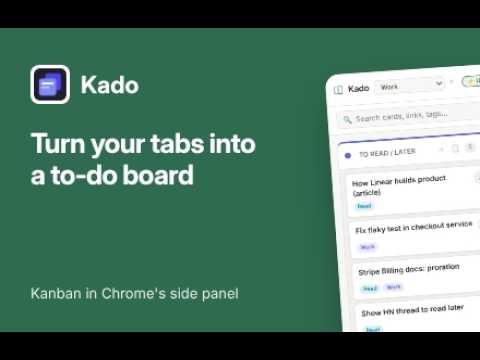
Turn your tabs into a to-do board in Chrome's side panel. Save any page in one right-click. No account, no subscription.
Too many tabs open because you're afraid you'll forget them? Kado turns them into a calm, simple to-do board that lives in Chrome's side panel, right next to the page you're working on. ★ SAVE ANY PAGE IN ONE RIGHT-CLICK Right-click any page → Add to Kado → pick a list. The page becomes a card with its link, so you can close the tab and keep the thought. Highlight text first and it's saved into the card's notes. ★ JUMP BACK TO THE RIGHT TAB All your Google Sheets tabs look the same? Give each card a clear name, then click ↗ to jump straight to that tab if it's already open, or open it if it isn't. No duplicate tabs. A green dot shows which cards are open right now. ★ A KANBAN BOARD THAT STAYS OUT OF YOUR WAY - Drag cards between To Read / Later, In Progress and Done (rename them, or add more lists with Pro) - Lives in the side panel: no new window, no switching apps - Clean, minimal design that loads instantly ★ STAY ON TOP OF IT - Checklists to break work into steps - Labels like Work, Read, Buy, Personal and Idea - Reminders with desktop notifications. Click one to go back to the page - "Remind me tomorrow at 9 AM" straight from the right-click menu ★ ORGANISED BY PROJECT - Separate workspaces for work, side projects and reading lists (Pro) - Instant search across every card, link and label - Export everything to CSV (Pro) ★ PRIVATE BY DESIGN - No sign-up, no account - Your boards, cards and notes are stored locally in your browser. No cloud account, nothing to sync to our servers - Kado doesn't track or send the sites you visit ★ FREE TO START, PAY ONCE FOR PRO Kado Free includes 1 workspace, 3 lists, 30 cards, 3 checklist items per card, 1 active reminder and 3 colors. Kado Pro is a one-time $29 lifetime license: unlimited workspaces, lists, cards, checklist items and reminders, all 8 colors and CSV export. Not a subscription. HOW TO START 1. Click the Kado icon (or pin it) to open the side panel 2. Right-click any web page → Add to Kado 3. Drag cards as your work moves Questions or feedback? Email support@command-palette.co. Kado is built by an independent developer, and every review helps. WHAT'S NEW IN 1.1.6 Fixed Delete doing nothing in some browsers (such as Dia). Deleting a card, list or workspace, and deactivating your license, now asks for confirmation in Kado’s own dialog. WHAT'S NEW IN 1.1.5 Card changes now save automatically: checklist ticks, notes, labels and dates. No more Save button. WHAT'S NEW IN 1.1.4 Click ↗ on a card to jump to the tab that's already open instead of opening a duplicate (Google Docs, Sheets and Slides included). A green dot shows which cards are open right now. Site icons are now drawn locally, so no requests go to Google. Fixes for search and narrow side panels.
5 out of 51 rating
Details
- Version1.1.6
- UpdatedOctober 18, 2026
- Size38.67KiB
- LanguagesEnglish
- DeveloperWebsite
Email
warut.c@command-palette.co - Non-traderThis developer has not identified itself as a trader. For consumers in the European Union, please note that consumer rights do not apply to contracts between you and this developer.
Privacy

Kado – Kanban Board & Tab Manager in Side Panel has disclosed the following information regarding the collection and usage of your data. More detailed information can be found in the developer's privacy policy.
Kado – Kanban Board & Tab Manager in Side Panel handles the following:
This developer declares that your data is
- Not being sold to third parties, outside of the approved use cases
- Not being used or transferred for purposes that are unrelated to the item's core functionality
- Not being used or transferred to determine creditworthiness or for lending purposes
Support
For help with questions, suggestions, or problems, visit the developer's support site