

Web Product Scraper – Excel Export & Product Image Downloader

Overview
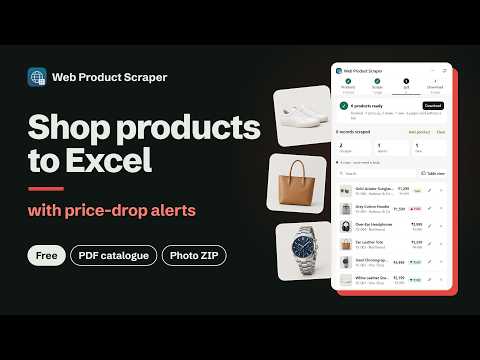
Free product scraper: shop pages to Excel or CSV, all photos in one ZIP, PDF catalogue with WhatsApp buttons, price-drop alerts.
Free product scraper for Chrome. Open a shop's category, search or product page and get its products in Excel or CSV in about a minute: names, prices, list prices, SKUs and photos. No code, no account, and your data stays in your browser unless you turn on AI tags. WHAT YOU GET • Excel, CSV or JSON: one row per product (or per size and colour), prices as real numbers, image and video links • Every product photo in one ZIP, a folder per product, named after it (JPG if you like) • A PDF catalogue with your logo and a WhatsApp button on every product • A catalogue website of your products with WhatsApp orders, to put online free • Price-drop alerts: repeat a page every day or week and get a notification when a price falls • An import file for your own Shopify or WooCommerce store (products arrive as drafts) • AI tags (optional): a category, tags and SEO keywords for every product, ready for the import file. Free, up to 300 products a day • Open in Google Sheets, Copy table, or send each product to a webhook (Zapier, Make, n8n) HOW IT WORKS 1. Products: click the icon on a shop page. The side panel lists its products with photo, name, price and SKU. 2. Scrape: choose this page, all pages or a range, then Quick (from the product cards) or Full (opens each product for the description, SKU and every photo). Tick "Add AI tags" to have the products tagged when the scrape ends. 3. List: everything you scraped. Prices that went up or down and new products are marked and counted. Add or edit products of your own. 4. Download: choose all rows, only the ticked ones, or only the changed ones, then the file. FOR RESELLERS AND SMALL SHOPS Copy a supplier's catalogue with your own codes (XX-001, XX-002 …) and your own price (add a percentage or an amount). Share it as a PDF or a website where customers order on WhatsApp with the product's code, name and price already typed in. Your business name, address, Instagram and GST number head the catalogue. WORKS ON MOST SHOPS Shopify, WooCommerce, Magento, BigCommerce and most other online shops are read without set-up. When a shop is read wrong, "Teach this site" lets you click the right price, photo or product card once, and every page of that shop is read right after that. PRIVACY AND POLITENESS Your products, settings and files stay on your computer. The extension sends nothing to any server unless you enter a webhook address of your own, or tick "Add AI tags": then only the names, descriptions and prices of the products to tag go to the Web Product Scraper server and Anthropic's Claude. It only reads pages you open, reads a few at a time with a pause between them, slows down by itself if a shop pushes back, and remembers the pace that works for each website. FAQ Is it free? Yes, every feature and every download. There is no paid plan. Do I need an account? No. Install it and click the icon on a shop page. Where does my data go? It stays in your browser until you download a file. Only with "Add AI tags" ticked are product names, descriptions and prices sent, to get the tags. What if a shop is not read correctly? Use "Teach this site" in step 1, or report the page from the ⋯ menu. Which files can I make? Excel (.xlsx), CSV, JSON, a photo and video ZIP, a PDF catalogue, a catalogue website, and Shopify or WooCommerce import files. WHAT'S NEW IN 1.11 • AI tags: tick "Add AI tags" in step 2 and every product gets a category, tags and SEO keywords when the scrape ends • The tags go into Excel, CSV, JSON and the Shopify (Type, Tags) and WooCommerce (Categories, Tags) import files • Give your own list of categories and each product gets one of them • Optional and off by default; free, up to 300 products a day • 1.10: a clearer side panel, the catalogue website, Add and Edit product, and auto speed Guides, videos and a sample shop to try it on: webproductscraper.com
5 out of 53 ratings
Details
- Version1.11.0
- UpdatedNovember 2, 2026
- Size541KiB
- Languages7 languages
- DeveloperWebsite
Email
ashutosh.gaikwad0106@gmail.com - Non-traderThis developer has not identified itself as a trader. For consumers in the European Union, please note that consumer rights do not apply to contracts between you and this developer.
Privacy

Web Product Scraper – Excel Export & Product Image Downloader has disclosed the following information regarding the collection and usage of your data. More detailed information can be found in the developer's privacy policy.
Web Product Scraper – Excel Export & Product Image Downloader handles the following:
This developer declares that your data is
- Not being sold to third parties, outside of the approved use cases
- Not being used or transferred for purposes that are unrelated to the item's core functionality
- Not being used or transferred to determine creditworthiness or for lending purposes
Support
For help with questions, suggestions, or problems, please open this page on your desktop browser