

Spaces Plus – Vertical Tabs, Sidebar & Split View

Overview
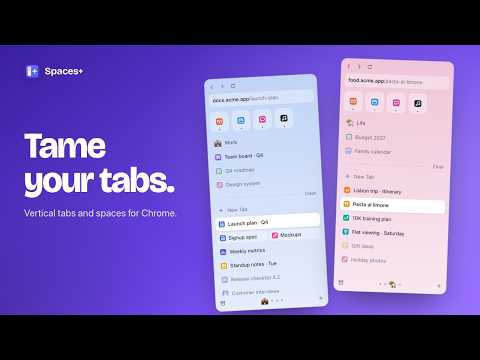
Vertical tabs with spaces, favorites, pinned tabs and split view. Any width, any look. Private, no account.
Spaces Plus puts your tabs in a clean vertical sidebar, sorted into spaces. Work, study and life each get their own tabs, pinned tabs, colour and icon, so you only see what you're working on. Make it as thin as an icon strip or as wide as you like, and style it your way. No account, no tracking: everything stays on your computer. 🔒 100% LOCAL. NOTHING IN THE CLOUD. Every space, tab and setting stays on your own computer. No account, no servers, no tracking. WHY SPACES+ ★ Any width. The floating sidebar goes from a 48 px icon strip up to 520 px. Drag its edge. Most sidebars can't go thinner than Chrome's 320 px side panel. ★ Nothing gets lost. Pinned tabs and Favorites are saved as bookmarks, and Spaces Plus keeps a backup of every space's open tabs. If Chrome opens without them, they come back. ★ Split view built in. Drop one tab onto another to see both side by side. ★ Your look. Colours, dark mode, sizes, corners and spacing. Show or hide every part. SPACES • Each space is a Chrome tab group with its own name, colour and emoji icon • 9 colours plus any custom colour • Switch with the space bar at the bottom, ⌘1–9 (Ctrl+1–9), Alt+Shift+← / →, or a two-finger sideways swipe • Other spaces go to sleep when you switch, so Chrome uses less memory • New tabs go into the space you're in • Rename, recolour, reorder and delete spaces FAVORITES AND PINNED TABS • Favorites: a grid of your everyday sites, shared by all spaces • Pinned tabs for each space. Close them and they stay in the list, ready to reopen • "Go back to pinned page" returns a pinned tab to where it started • Drag tabs between Favorites, pinned and open tabs, or reorder by dragging • Saved as bookmarks, so they sync with your Google account when Chrome sync is on SPLIT VIEW • Drag a tab onto another tab to split them • Or right-click: "Split with new tab" or "Split view with…" • Swap sides, separate, copy both links, or close both from the menu • Uses Chrome's built-in split view (Chrome 155 or newer) COMMAND BAR • Press ⌘K (Ctrl+K) in the sidebar, or click the address bar • Search every open tab, pinned tab, Favorite and bookmark across all spaces • Type an address to open it, or words to search with your default search engine LIBRARY • Downloads grouped by day, with search. Open a file, show it in its folder, copy its link • Archived tabs: recently closed tabs and windows, one click to bring them back • All your spaces at a glance NEVER LOSE TABS • Spaces Plus remembers each space's open tabs • If Chrome starts without them (after a crash, an update or a restart), they come back asleep, in the right space • A shortcut to turn on Chrome's own "Continue where you left off" FLOATING OR SIDE PANEL • Floating: a slim window that sticks to the left of your browser window and moves with it • Side panel: use Chrome's built-in side panel instead • Back, forward, reload and an address bar with copy link built in CUSTOMIZE EVERYTHING • Show or hide: navigation buttons, address bar, Favorites, space name, New Tab, Clear, space switcher, hints • Sizes: text, tab height, Favorite tiles, corner roundness, edge spacing • Look: auto, light or dark; follow each space's colour or pick one colour; colour strength; flat or gradient • Space switcher as dots, icons, or auto HANDY EXTRAS • Clear closes a space's open tabs but keeps its pins • Put tabs to sleep, duplicate, copy link, move to Favorites from the right-click menu • Sound indicator and mute on playing tabs • Sleeping tabs are shown faded • Alt+S (Option+S on Mac) opens the sidebar from anywhere • Start over: wipe all spaces and pins in one step when you want a clean slate 100% LOCAL, NOTHING IN THE CLOUD • All your data is stored locally, in Chrome on your own computer • Nothing is uploaded. Spaces Plus has no servers and never sends your data anywhere • No account, no sign-in, no ads, no analytics, no tracking • Works fully offline • Uninstall it and everything it stored is gone WHY THESE PERMISSIONS • Tabs and tab groups: to show and organise your tabs into spaces • Bookmarks: Favorites and pinned tabs are saved as bookmarks in a "Spaces Plus" folder • Downloads and sessions: for the Library's downloads and recently closed tabs • Storage: your settings and the tab backup, on your computer only • Display: to keep the floating sidebar on the correct screen Made by AppMotives, an independent product studio. Questions or ideas? Email support@appmotives.com or visit https://appmotives.com/
0 out of 5No ratings
Details
- Version4.8.3
- UpdatedNovember 6, 2026
- Offered byAppMotives
- Size46.34KiB
- LanguagesEnglish
- DeveloperTANVIR RAHMAN
MIA BARI, MUKSUDPUR, BONGRAM GOPALGANJ 8141 BDEmail
support@appmotives.comPhone
+880 1774-652633 - TraderThis developer has identified itself as a trader per the definition from the European Union and committed to only offer products or services that comply with EU laws.
Privacy

Spaces Plus – Vertical Tabs, Sidebar & Split View has disclosed the following information regarding the collection and usage of your data. More detailed information can be found in the developer's privacy policy.
Spaces Plus – Vertical Tabs, Sidebar & Split View handles the following:
This developer declares that your data is
- Not being sold to third parties, outside of the approved use cases
- Not being used or transferred for purposes that are unrelated to the item's core functionality
- Not being used or transferred to determine creditworthiness or for lending purposes
Support
For help with questions, suggestions, or problems, please open this page on your desktop browser