

Just-One-Page-PDF: An awesome web page to PDF tool

Overview
Use Just-One-Page-PDF in just a few clicks. Easily capture entire webpage or selection area as high-quality PDF.
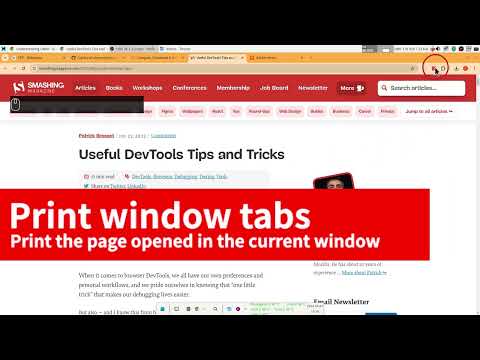
## Introduce Just One Page PDF(JOPP), save any web page, any area as high-quality PDF, like a screenshot tool, but save as PDF format. ## Why save a webpage as a PDF? 1. Permanent Archiving & Content Preservation - Immunity to link rot - Offline accessibility 2. Universal Formatting & Compatibility - What You See Is What You Get (WYSIWYG) - Device independence 3. Information Management & Productivity - Easy annotation - Knowledge organization 4. Secure Sharing & Printing - Reliable distribution - Print-ready layout ## Key Features of Just One Page PDF (JOPP) More than just a "download button," JOPP serves as a **lightweight, local layout workstation**—purpose-built for high-frequency knowledge management, operational auditing, legal documentation, and archiving. ### 1. 100% High-Fidelity Vector Rendering (Not Just Image-to-PDF) Unlike other tools that simply capture a long screenshot and embed it into a PDF—resulting in blurry text when zoomed and bloated file sizes—JOPP utilizes native vector rendering. The exported text remains **fully selectable, copyable, and searchable (via `Ctrl+F`)**, ensuring perfect clarity even at extreme zoom levels. ### 2. Intuitive "Area Selection"—As Easy as Taking a Screenshot Beyond capturing an entire webpage, JOPP allows you to use your mouse to select any specific section—just like taking a screenshot. You can also enable "Clean Mode" to instantly strip away floating ads and unnecessary sidebars, enabling true **on-demand, region-specific printing**. ### 3. Efficient Batch Export and Seamless Merging Designed for power users who handle large volumes of information, JOPP supports **multi-task batch exporting** for dozens of open tabs (such as technical documentation or news articles). Furthermore, you can **seamlessly merge multiple independent PDF files** directly within the extension—no third-party tools required. ### 4. Automated Outline and Navigation Bookmarks JOPP intelligently detects the H1, H2, and H3 heading structure of a webpage and automatically converts it into a **navigation outline (bookmarks)** within the PDF. This significantly boosts efficiency when navigating long documents or compliance manuals spanning dozens of pages. ### 5. Professional-Grade Layout Customization (Pre- and Post-Export) Before exporting, you can leverage a powerful suite of customization tools: * **Header and Footer Settings:** Easily add page numbers, webpage titles, capture dates, or source URLs, greatly enhancing document traceability. * **Custom Footers/Watermarks**: Inject dynamic, anti-counterfeit watermarks into internal or confidential documents with a single click, reducing the risk of data leaks. * **Add Covers and Back Pages**: Automatically append professional covers, project summaries, or disclaimers to your web pages, instantly transforming standard web content into formal reports. * **Pixel-Perfect CSS Injection**: Modify font sizes, apply eye-friendly background colors, or force line-wrapping in code blocks—all before the document is generated for print. ### 6. 100% Local Execution, Zero Privacy Risk This is a core, foundational principle of JOPP. All web page parsing, CSS injection, document slicing, and merging processes occur **entirely within your local browser—no data is ever uploaded to a cloud server**. Whether it involves personal privacy or sensitive business information, your data remains protected by a robust, built-in security layer. ### 7. One-Click Cloud Synchronization Seamlessly integrates with major cloud storage services, including Google Drive, OneDrive, and Dropbox. Once a PDF is generated locally, you can sync it to the cloud with a single click, allowing you to access and read your documents effortlessly across all your devices—from smartphones to tablets—anytime, anywhere. ## Compare with the browser's build-in printing function 1. no print preview dialog, direct download 2. customize any page size as you want 3. multiple tabs to export PDF at one time 4. disable or enable print media as required 5. customize style before export PDF 6. supports printing by selecting nodes or selecting areas
4.4 out of 5283 ratings
Details
- Version2.0.2
- UpdatedOctober 21, 2026
- Size8.07MiB
- Languages52 languages
- DeveloperWebsite
Email
suziwen1@gmail.com - Non-traderThis developer has not identified itself as a trader. For consumers in the European Union, please note that consumer rights do not apply to contracts between you and this developer.
Privacy

This developer declares that your data is
- Not being sold to third parties, outside of the approved use cases
- Not being used or transferred for purposes that are unrelated to the item's core functionality
- Not being used or transferred to determine creditworthiness or for lending purposes
Support
For help with questions, suggestions, or problems, visit the developer's support site