


Overview
A lightweight, fast, privacy-friendly ad & tracker blocker built on Manifest V3 with efficient rule compression.
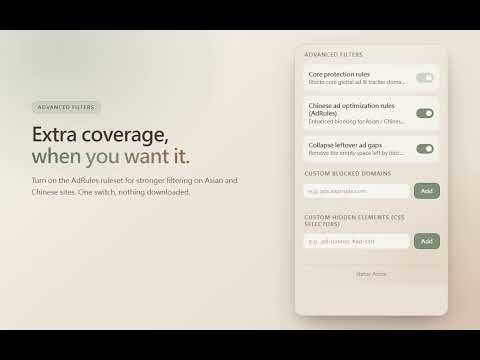
Just Ad Blocker keeps your browsing clean and fast without compromising your privacy. Built on Manifest V3's declarativeNetRequest engine, it blocks ad and tracker requests at the browser's network layer — so it never collects or transmits your page content, never phones home, and uses almost no memory. A small on-page script tidies the blank space that blocked ads leave behind; it runs entirely on your device and sends nothing anywhere. FEATURES * Dual-list protection — AdGuard DNS filter (~150,000 ad/tracker/malware domains) plus EasyList, the industry-standard list for on-page ad blocking. Currently, list updates are triggered periodically through a GitHub automation workflow. On a weekly basis, it refetches upstream lists, compiles and validates DNR rules, and publishes new releases, which then undergo official Google Chrome browser review for approval. The development team has plans to further shorten the update cycle in the future, bringing rule updates closer to the maintenance rhythm of the upstream lists. * Tidy layout — automatically collapses the empty gaps that blocked ads leave behind, so pages don't show blank ad slots. Can be turned off in the popup. * Optional Chinese ruleset (AdRules) — extra coverage for Asian and Chinese sites, toggled from the popup with a single switch. * One-click per-site whitelist — pause blocking on any site you trust, plus a list to review and remove paused sites. * Live block counter — see how many requests were blocked on the current tab and your lifetime total. * Privacy by design — no analytics, no accounts, no remote code. Everything runs on your device. HOW TO USE 1. Click the Just Ad Blocker icon in your toolbar to open the popup. 2. Use the main toggle to enable or pause ad blocking globally. 3. To whitelist the current site, click "Pause blocking on this site" in the popup. 4. To enable enhanced filtering for Chinese/Asian websites, expand "Advanced filters" and turn on the AdRules toggle. 5. To block a domain the lists missed, add it under "Custom blocked domains" (covers all subdomains; reload the page after adding). To remove a leftover empty ad slot, add a CSS selector under "Custom hidden elements". PERMISSIONS This extension uses only the permissions required to block ads and tidy the resulting layout. It does not collect your browsing history, passwords, or personal data. Network blocking runs as static filter lists inside the browser, and the on-page tidy-up script inspects page layout locally only — nothing is sent externally. PRIVACY No data collection. No remote servers. No analytics. Your preferences (on/off state, whitelisted sites) are stored only in your browser's local storage
5 out of 54 ratings
Details
- Version1.1.21
- UpdatedNovember 3, 2026
- Size3.24MiB
- Languages2 languages
- DeveloperWebsite
Email
ivanusto@gmail.com - Non-traderThis developer has not identified itself as a trader. For consumers in the European Union, please note that consumer rights do not apply to contracts between you and this developer.
Privacy

This developer declares that your data is
- Not being sold to third parties, outside of the approved use cases
- Not being used or transferred for purposes that are unrelated to the item's core functionality
- Not being used or transferred to determine creditworthiness or for lending purposes
Support
For help with questions, suggestions, or problems, please open this page on your desktop browser