Jump Cutter のアイテムロゴ画像

Jump Cutter

おすすめ
4.8(

103 件の評価

)
拡張機能教育10,000 ユーザー
Jump Cutter のアイテム メディア 5 のスクリーンショット
Jump Cutter のアイテム メディア 6 のスクリーンショット
アイテムの動画サムネイル
Jump Cutter のアイテム メディア 2 のスクリーンショット
Jump Cutter のアイテム メディア 3 のスクリーンショット
Jump Cutter のアイテム メディア 4 のスクリーンショット
Jump Cutter のアイテム メディア 5 のスクリーンショット
Jump Cutter のアイテム メディア 6 のスクリーンショット
アイテムの動画サムネイル
Jump Cutter のアイテム メディア 2 のスクリーンショット
アイテムの動画サムネイル
Jump Cutter のアイテム メディア 2 のスクリーンショット
Jump Cutter のアイテム メディア 3 のスクリーンショット
Jump Cutter のアイテム メディア 4 のスクリーンショット
Jump Cutter のアイテム メディア 5 のスクリーンショット
Jump Cutter のアイテム メディア 6 のスクリーンショット

概要

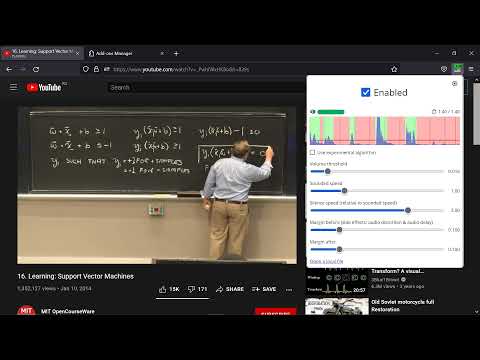
文と文の間をスキップすることで2倍速く動画を視聴できます

⏩ Skips (or fast-forwards) silent parts in videos in real time and completely automatically. 🌐 Supports YouTube, Coursera, Twitch, local files, and (almost) any other website. Useful for watching 👨‍🏫 lectures,🔴 stream recordings (VODs), 🎙️ podcasts, webinars, 📞 call & audio recordings, and other unedited videos where the speakers spend a portion of time on things other than talking. But even if the video is tightly packed, it can also save a bit of time, so it's generally fine to keep it always on. 🕵️🚫 Fully offline and local. Does not track you or send your data anywhere. 🔃 Easy to turn on and off, without having to reload the page (it's there to save time after all!). ⚙️ Has a lot of different settings, but generally you won't have to constantly tune them or touch them at all. ⌨️ Has a lot of handy shortcuts (hotkeys): control video playback and extension settings without using a mouse (or eyes). 🆓🍺 Completely free, both as in "freedom" and as in "free beer" (at least for now): Licensed under GNU Affero General Public License v3.0 or any later version (AGPL-3.0-or-later) — the most based license out there. 👨‍💻 Source code: https://github.com/WofWca/jumpcutter --- Inspired by this video by carykh: https://www.youtube.com/watch?v=DQ8orIurGxw

詳細

  • バージョン
    1.32.2
  • 更新:
    2026年2月2日
  • 提供元
    WofWca
  • サイズ
    316KiB
  • 言語
    26 言語
  • デベロッパー
    メール
    wofwca@protonmail.com
  • 非取引業者
    このデベロッパーは取引業者として申告していません。EU 加盟国の消費者とこのデベロッパーとの間に締結された契約には、消費者の権利が適用されません。

プライバシー

拡張機能を管理し、組織での使用状況を確認できます
デベロッパーは、お客様のデータを収集または使用しないことを表明しています。

このデベロッパーは、お客様のデータについて以下を宣言しています

  • 承認されている以外の用途で第三者に販売しないこと
  • アイテムの中心機能と関係のない目的で使用または転送しないこと
  • 信用力を判断する目的または融資目的で使用または転送しないこと

サポート

関連アイテム

Saima AI Video Speed Controller & Smart Note-Taking

4.5

The AI-powered video speed controller with smart note-taking for YouTube, Coursera, Udemy, and more

UCSD Podcast Silence Fast-Forward

5.0

Help skip silence in UCSD podcasts.

YouTube Silence Skipper

3.3

Automatically skips silent periods in YouTube videos for a smoother viewing experience.

Qoala: Cashback y Cupones Automaticos

4.5

Cupones descuento automáticos y cashback - Te devolvemos dinero por tus compras

Jumpcut

3.7

Navigate YouTube videos through description timestamps and comment chapters.

Highlights for YouTube

4.2

View highlights on the video player, that are generated from timestamps found in the description and top comments.

DeArrow - YouTube の題名や画像を改善

4.3

大げさな題名や画像をやめクラウドソーシングにより説明的な内容に改善

Mouse Tooltip Translator - PDF & Netflix Youtube dual subs

4.6

マウスツールチップ翻訳者は、Google翻訳を使用してマウスオーバーテキストを翻訳します. Support OCR, TTS, manga translator & pdf translator.

Clickbait Remover for Youtube

4.5

Replaces thumbnails and modifies titles of videos on youtube.com

BiRead - ウェブサイトの並列翻訳 | バイリンガル字幕

5.0

AIを使って、ワンクリックでウェブサイトの内容をバイリンガルに変換。他の言語での読みやすさを実現。

Timestamped YouTube Comments

4.2

See timestamped comments as you watch

VideoSkip

4.4

Skips/mutes/blanks selected parts of streaming videos

Saima AI Video Speed Controller & Smart Note-Taking

4.5

The AI-powered video speed controller with smart note-taking for YouTube, Coursera, Udemy, and more

UCSD Podcast Silence Fast-Forward

5.0

Help skip silence in UCSD podcasts.

YouTube Silence Skipper

3.3

Automatically skips silent periods in YouTube videos for a smoother viewing experience.

Qoala: Cashback y Cupones Automaticos

4.5

Cupones descuento automáticos y cashback - Te devolvemos dinero por tus compras

Jumpcut

3.7

Navigate YouTube videos through description timestamps and comment chapters.

Highlights for YouTube

4.2

View highlights on the video player, that are generated from timestamps found in the description and top comments.

DeArrow - YouTube の題名や画像を改善

4.3

大げさな題名や画像をやめクラウドソーシングにより説明的な内容に改善

Mouse Tooltip Translator - PDF & Netflix Youtube dual subs

4.6

マウスツールチップ翻訳者は、Google翻訳を使用してマウスオーバーテキストを翻訳します. Support OCR, TTS, manga translator & pdf translator.

Google アプリ