

JUMBOmail
1 rating
)
Overview
Send large files with JUMBOmail — upload, copy the link, share it anywhere.
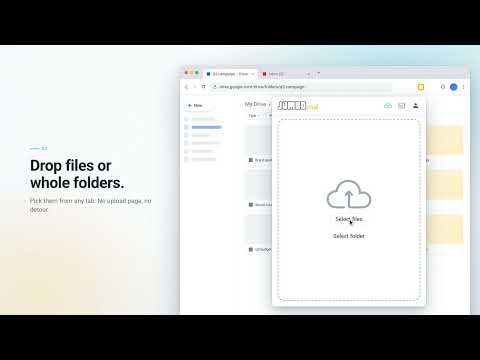
JUMBOmail for Chrome puts the JUMBOmail uploader in your browser toolbar, so you can send large files without leaving the page you're on. HOW IT WORKS 1. Click the JUMBOmail icon in the toolbar. 2. Drop in files or whole folders, or pick them from your computer. 3. Choose "Generate link" to get a download link you can paste anywhere, or "Send mail" to deliver it by email. 4. Keep browsing. The upload keeps running when the popup closes, and the link is waiting when you come back. SET THE RULES FOR EVERY DELIVERY • Expiry date – decide how long the files stay available. • Password – protect the download with a password you share separately. • Download limit – cap how many times the files can be downloaded. • Sharing access – anyone with the link, your organization only, or specific recipients. • Download notifications – get an email when someone downloads. • Save for good – keep a delivery in your account with no expiry (subscribers). SHARE THE LINK ANYWHERE Copy the link with one click, open it, or share it straight to WhatsApp, Telegram, Gmail or your email app. KNOW WHO DOWNLOADED WHAT • Sent – every delivery you've made, with search. • Delivery details – change the password, expiry, download limit and recipients after sending, or remove a delivery. • Download tracking – totals, unique downloaders and a log of every download. WORKS WITH YOUR JUMBOMAIL ACCOUNT Sign in with your email and password, Google or Microsoft. The extension uses the same account, storage and plan limits as jumbomail.me, so everything you send here shows up on the website and in the Outlook add-in too. Don't have an account yet? Create a free one at jumbomail.me. Available in English and Hebrew (right-to-left). PERMISSIONS The extension talks only to JUMBOmail's servers to upload your files and manage your deliveries, and to your sign-in provider when you choose Google or Microsoft login. It doesn't read the pages you visit. Support: https://www.jumbomail.me
5 out of 51 rating
Details
- Version1.0.1
- UpdatedSeptember 30, 2026
- Offered byJUMBOmail
- Size304KiB
- LanguagesEnglish (United States)
- Developer
Email
support@jumbomail.me - Non-traderThis developer has not identified itself as a trader. For consumers in the European Union, please note that consumer rights do not apply to contracts between you and this developer.
Privacy

JUMBOmail has disclosed the following information regarding the collection and usage of your data. More detailed information can be found in the developer's privacy policy.
JUMBOmail handles the following:
This developer declares that your data is
- Not being sold to third parties, outside of the approved use cases
- Not being used or transferred for purposes that are unrelated to the item's core functionality
- Not being used or transferred to determine creditworthiness or for lending purposes
Support
For help with questions, suggestions, or problems, visit the developer's support site