

JSON Viewer – Visualize JSON as Interactive Graphs

Overview
Visualize JSON data with the JSON Viewer Extension! Explore structures in a dynamic graph, with zoom, pan, and export features
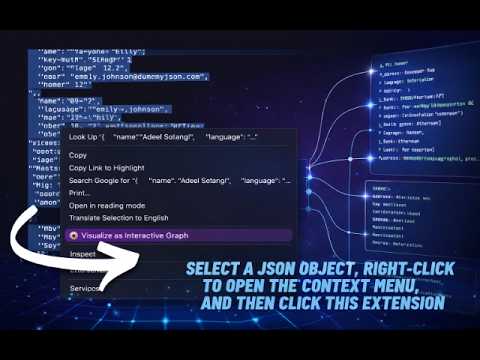
View JSON Data Effortlessly with the JSON Viewer Chrome Extension Tired of sifting through cluttered JSON files? Whether you're debugging API responses or trying to make sense of deeply nested data, the JSON Viewer Extension makes it fast, visual, and intuitive. Why Use This Extension? This lightweight Chrome extension transforms raw JSON into a beautifully organized format—perfect for developers, analysts, and curious minds alike. 🚀 Key Features 📊 Graph Visualization Simply select any JSON data, right-click, and choose the extension from the context menu to instantly generate an interactive graph view—no manual setup needed. 🔍 Graphical Search Quickly locate specific keys or values within large datasets. Search results are highlighted directly in the graph for better navigation. 🔎 Zoom In/Out Explore your data from macro to micro. Effortlessly zoom in and out to inspect structures in detail or get a broad overview. 🖼️ Export as Image Once you've created the perfect visualization, export or copy it as an image—great for documentation or sharing insights with your team. Simplify your JSON workflow and gain instant clarity with this powerful, user-friendly JSON Viewer Extension.
4 out of 54 ratings
Details
- Version1.0.0
- UpdatedMarch 3, 2026
- Size913KiB
- LanguagesEnglish
- DeveloperWebsite
Email
bugblitz.dev@gmail.com - Non-traderThis developer has not identified itself as a trader. For consumers in the European Union, please note that consumer rights do not apply to contracts between you and this developer.
Privacy

This developer declares that your data is
- Not being sold to third parties, outside of the approved use cases
- Not being used or transferred for purposes that are unrelated to the item's core functionality
- Not being used or transferred to determine creditworthiness or for lending purposes
Support
For help with questions, suggestions, or problems, visit the developer's support site