

JSON Beautifier and Editor
53 оцінки
)
Огляд
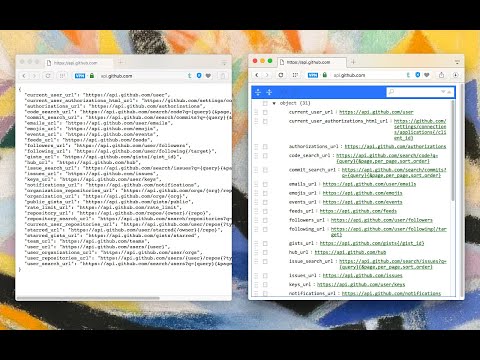
Display JSON objects by transforming them into Syntax editable highlighted HTML to validate, format, and save
This extension monitors JSON pages and converts them into a human-readable object. You can view, edit, search through values and keys. You can even change the format of a key or drag it into a new place. There is no need to do anything after installation. Just open a JSON page and the extension automatically converts the page into the editor mode. As of version 0.2.0, the extension uses a dark theme if your browser's default theme is dark. Supported mime types: ► application/json ► application/x-javascript ► application/hal+json ► application/vnd.error+json ► application/vnd.api+json ► text/javascript ► text/x-javascript ► text/x-json ► text/plain FEATURES ► Supports both JSON & JSONP formats ► Has light and dark syntax highlighting themes ► Supports collapsible trees ► Converts text links into clickable URLs ► Supports raw, code, and parsed JSON views ► Keeps expanded structure when refreshing the JSON page ► Copy Object Path ► Copy Outer JSON ► Copy Inner JSON ► Open a new editor to write a new JSON object ► Open a new editor from selection text (right-click context menu) ► Supports large numbers (BigInt, BigFloat, ...) -- Change Logs: 0.1.3: 1. It is now possible to beautify local (file://) JSON files. 2. Extension now uses "persistent = false" background page (event page) to have no performance effect when it is not used. 0.1.6: 1. It is now possible to change the view mode to "Tree", "Code", and "Text" modes. The coding mode is useful to edit the raw JSON, and the text mode is useful to copy the raw data. The default view is the tree view which displays the JSON in a formatted and highlighted format.
4,8 з 553 оцінки
Деталі
- Версія0.6.5
- Оновлено12 листопада 2025 р.
- Розробник:yokris.dev
- Розмір488KiB
- МовиКількість мов: 13
- Розробник
Електронна пошта
yokris.dev@gmail.com - Не продавецьЦей розробник не ідентифікував себе як продавець. Зверніть увагу, що права споживачів у Європейському Союзі не поширюються на контракти з цим розробником.
Конфіденційність
Цей розробник заявляє, що ваші дані:
- не продаються третім особам (за винятком дозволених випадків)
- не використовуються й не передаються для цілей, що не пов’язані з основними функціями продукту
- не використовуються й не передаються для визначення кредитоспроможності або в цілях кредитування
Підтримка
Із запитаннями, пропозиціями й проблемами звертайтеся на сайт підтримки розробника.