

JSON Beautifier and Editor
การให้คะแนน 53 รายการ
)
ภาพรวม
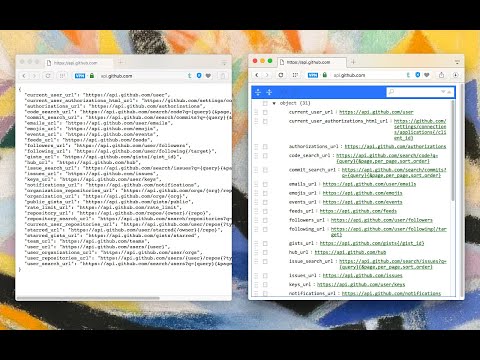
Display JSON objects by transforming them into Syntax editable highlighted HTML to validate, format, and save
This extension monitors JSON pages and converts them into a human-readable object. You can view, edit, search through values and keys. You can even change the format of a key or drag it into a new place. There is no need to do anything after installation. Just open a JSON page and the extension automatically converts the page into the editor mode. As of version 0.2.0, the extension uses a dark theme if your browser's default theme is dark. Supported mime types: ► application/json ► application/x-javascript ► application/hal+json ► application/vnd.error+json ► application/vnd.api+json ► text/javascript ► text/x-javascript ► text/x-json ► text/plain FEATURES ► Supports both JSON & JSONP formats ► Has light and dark syntax highlighting themes ► Supports collapsible trees ► Converts text links into clickable URLs ► Supports raw, code, and parsed JSON views ► Keeps expanded structure when refreshing the JSON page ► Copy Object Path ► Copy Outer JSON ► Copy Inner JSON ► Open a new editor to write a new JSON object ► Open a new editor from selection text (right-click context menu) ► Supports large numbers (BigInt, BigFloat, ...) -- Change Logs: 0.1.3: 1. It is now possible to beautify local (file://) JSON files. 2. Extension now uses "persistent = false" background page (event page) to have no performance effect when it is not used. 0.1.6: 1. It is now possible to change the view mode to "Tree", "Code", and "Text" modes. The coding mode is useful to edit the raw JSON, and the text mode is useful to copy the raw data. The default view is the tree view which displays the JSON in a formatted and highlighted format.
4.8 จาก 5 คะแนนการให้คะแนน 53 รายการ
รายละเอียด
- รุ่น0.6.5
- อัปเดตแล้ว12 พฤศจิกายน 2568
- นำเสนอโดยyokris.dev
- ขนาด488KiB
- ภาษา13 ภาษา
- นักพัฒนาซอฟต์แวร์
อีเมล
yokris.dev@gmail.com - ไม่ใช่ผู้ค้านักพัฒนาซอฟต์แวร์รายนี้ไม่ได้ระบุว่าตัวเองเป็นผู้ค้า สำหรับผู้บริโภคในสหภาพยุโรป โปรดทราบว่าสิทธิของผู้บริโภคไม่มีผลกับสัญญาระหว่างคุณกับนักพัฒนาซอฟต์แวร์รายนี้
ความเป็นส่วนตัว
นักพัฒนาซอฟต์แวร์รายนี้ประกาศว่าข้อมูลของคุณจะ
- ไม่ถูกขายไปยังบุคคลที่สามหากไม่ใช่ Use Case ที่ได้รับอนุมัติ
- ไม่ถูกใช้หรือถูกโอนเพื่อวัตถุประสงค์ที่ไม่เกี่ยวข้องกับฟังก์ชันการทำงานหลักของรายการ
- ไม่ถูกใช้หรือถูกโอนเพื่อพิจารณาความน่าเชื่อถือทางเครดิตหรือเพื่อวัตถุประสงค์การให้สินเชื่อ
สนับสนุน
โปรดไปที่เว็บไซต์สนับสนุนของนักพัฒนาซอฟต์แวร์ หากมีข้อสงสัย ต้องการขอคำแนะนำ หรือพบปัญหาใดๆ