

JSON Beautifier and Editor
54 betyg
)

Översikt
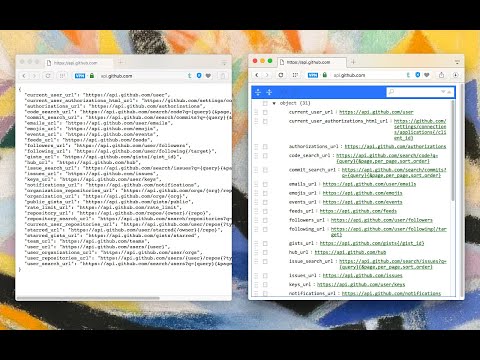
Display JSON objects by transforming them into Syntax editable highlighted HTML to validate, format, and save
This extension monitors JSON pages and converts them into a human-readable object. You can view, edit, search through values and keys. You can even change the format of a key or drag it into a new place. There is no need to do anything after installation. Just open a JSON page and the extension automatically converts the page into the editor mode. As of version 0.2.0, the extension uses a dark theme if your browser's default theme is dark. Supported mime types: ► application/json ► application/x-javascript ► application/hal+json ► application/vnd.error+json ► application/vnd.api+json ► text/javascript ► text/x-javascript ► text/x-json ► text/plain FEATURES ► Supports both JSON & JSONP formats ► Has light and dark syntax highlighting themes ► Supports collapsible trees ► Converts text links into clickable URLs ► Supports raw, code, and parsed JSON views ► Keeps expanded structure when refreshing the JSON page ► Copy Object Path ► Copy Outer JSON ► Copy Inner JSON ► Open a new editor to write a new JSON object ► Open a new editor from selection text (right-click context menu) ► Supports large numbers (BigInt, BigFloat, ...) -- Change Logs: 0.1.3: 1. It is now possible to beautify local (file://) JSON files. 2. Extension now uses "persistent = false" background page (event page) to have no performance effect when it is not used. 0.1.6: 1. It is now possible to change the view mode to "Tree", "Code", and "Text" modes. The coding mode is useful to edit the raw JSON, and the text mode is useful to copy the raw data. The default view is the tree view which displays the JSON in a formatted and highlighted format.
4,8 av 554 betyg
Information
- Version0.6.6
- Uppdaterat23 februari 2026
- Erbjudandet kommer frånyokris.dev
- Storlek490KiB
- Språk13 språk
- Utvecklare
E-post
yokris.dev@gmail.com - Icke-näringsidkareUtvecklaren har inte angett att den är näringsidkare. Konsumenter i EU bör tänka på att konsumenträttigheter inte gäller för avtal mellan dig och denna utvecklare.
Integritet

Denna utvecklare försäkrar att din data
- inte säljs till tredje part, förutom i godkända användningsfall
- inte används eller överförs för ändamål som inte är relaterade till objektets huvudfunktioner
- inte används eller överförs i syfte att bedöma kreditvärdighet eller för lån.
Support
Om du behöver hjälp med frågor, förslag eller problem kan du besöka utvecklarens supportwebbplats