

Journey Capture

Overview
Capture annotated screenshots as you document user journeys
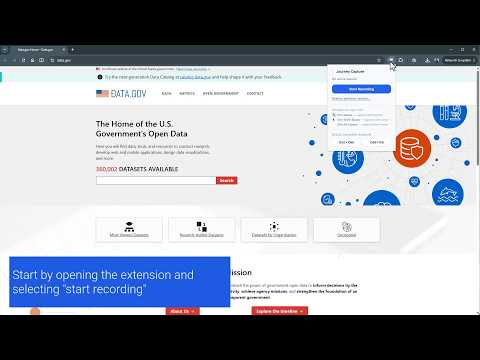
Journey Capture makes it easy to document any user journey or workflow with annotated screenshots — no design tools required. Start a recording session, then use simple keyboard shortcuts to capture exactly what you need as you browse: • Ctrl+Space — capture with a pointer cursor • Ctrl+Shift+Space — capture with a click arrow • Ctrl+Alt+Space — capture a clean frame with no cursor When you're done, stop the session to open your results. From there you can: • Add a title and notes to each step • Reorder or delete steps • Toggle URLs, step labels, and notes background • Print directly to PDF • Download as a Markdown file + images (ready to paste into docs or wikis) • Save your session as a .journey file and reopen it later to continue editing Bonus: quick-action buttons let you resize your browser viewport to standard screen sizes (1920×1080, 1366×768) so your screenshots are always consistent. All data stays on your device — nothing is collected or transmitted.
0 out of 5No ratings
Details
- Version1.0.0
- UpdatedMay 30, 2026
- Offered bythomas.murray09
- Size65.79KiB
- LanguagesEnglish
- Developer
Email
thomas.murray09@gmail.com - Non-traderThis developer has not identified itself as a trader. For consumers in the European Union, please note that consumer rights do not apply to contracts between you and this developer.
Privacy

This developer declares that your data is
- Not being sold to third parties, outside of the approved use cases
- Not being used or transferred for purposes that are unrelated to the item's core functionality
- Not being used or transferred to determine creditworthiness or for lending purposes