


Overview
Local-first screen recorder with offscreen capture
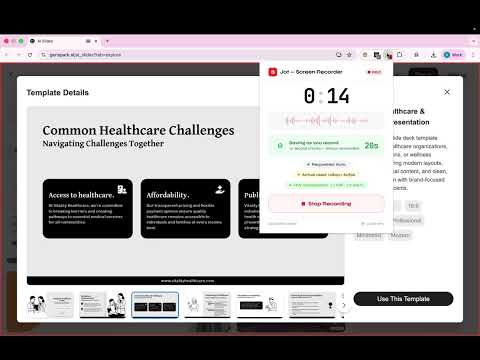
Jot — Screen Recorder Record anything. Lose nothing. Every other screen recorder is built around the happy path. Jot is built around what happens when things go wrong. ────────────────────────────────────── WHY JOT IS DIFFERENT ────────────────────────────────────── ✓ Never lose a recording Your recording is automatically saved to your device every 10 seconds as you record. If something goes wrong — browser crash, extension reload, anything — your footage is safe. Always. ✓ Audio verified before you start Jot checks your microphone before every single recording. You'll never finish a 30-minute session only to discover the audio was silent the whole time. ✓ MP4 that plays everywhere No WebM files nobody can open. Jot converts your recording to H.264 MP4 — the format that plays in QuickTime, VLC, Chrome, Windows Media Player, iOS, Android. Everywhere. ✓ 100% local. Your recordings never leave your device. Everything happens on your computer. No uploads, no cloud, no servers. We technically cannot see your recordings because we never receive them. ✓ No account required Install and record. Nothing else. ────────────────────────────────────── HOW IT WORKS ────────────────────────────────────── 1. Click the Jot icon in your toolbar 2. Toggle your microphone on if you want your voice recorded 3. Click Start Recording and choose your tab or window 4. Record as long as you need 5. Click Stop — Jot converts to MP4 and you download it That's it. ────────────────────────────────────── WHAT JOT PROTECTS YOU FROM ────────────────────────────────────── → Truncated recordings that cut off after a few minutes → Silent recordings where audio never captured → WebM output files that won't play on most devices → Lost recordings when you accidentally close a tab → Out of memory crashes on long recordings → Export failures with no way to recover your footage ────────────────────────────────────── TECHNICAL DETAILS ────────────────────────────────────── - Recording format: WebM (VP9) during capture - Export format: H.264 MP4 with AAC audio - Processing: 100% local via WebAssembly — no servers - Storage: Chrome's Origin Private File System (OPFS) - Permissions required: Screen capture, Microphone (optional) - No account, no sign-up, no email required - Zero network requests during recording or processing ────────────────────────────────────── PERMISSIONS EXPLAINED ────────────────────────────────────── Jot requests only what it needs: - Screen capture — to record your screen - Microphone — only if you enable the mic toggle - Storage — to save recordings locally on your device - Tabs — to show the recording badge on your active tab We do not request access to your browsing history, passwords, or any personal data. ────────────────────────────────────── PRIVACY ────────────────────────────────────── Your recordings never leave your computer. All processing happens locally in your browser using WebAssembly. We have no servers involved in recording, processing, or storage. We cannot see, access, or share your recordings — because we technically never receive them. No network requests occur during recording or processing. ────────────────────────────────────── SUPPORT ────────────────────────────────────── Found a bug or have a question? Email: dakshpareek7@gmail.com ────────────────────────────────────── Jot is built for developers, support engineers, educators, and anyone who records their screen regularly and cannot afford to lose what they capture. Record anything. Lose nothing.
5 out of 51 rating
Details
- Version1.2.2
- UpdatedJuly 1, 2026
- Size9.92MiB
- LanguagesEnglish
- DeveloperWebsite
Email
dakshpareek7@gmail.com - Non-traderThis developer has not identified itself as a trader. For consumers in the European Union, please note that consumer rights do not apply to contracts between you and this developer.
Privacy

This developer declares that your data is
- Not being sold to third parties, outside of the approved use cases
- Not being used or transferred for purposes that are unrelated to the item's core functionality
- Not being used or transferred to determine creditworthiness or for lending purposes
Support
For help with questions, suggestions, or problems, please open this page on your desktop browser