

RecordPlus - Screen Recorder

Overview
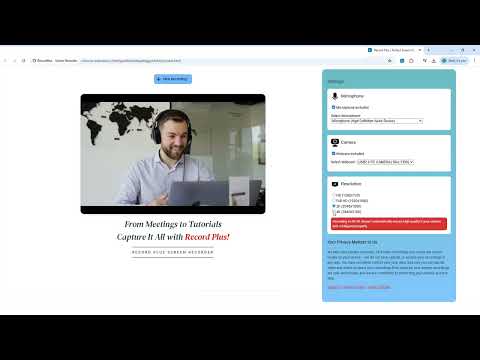
Captures tabs, desktop, webcam, microphone, and system sound. Annotate with pencil tool and color picker.
Record Plus – The Ultimate Chrome Extension for Screen Recording with Annotations! Make Recording Simple, Smart, and Powerful! Record Plus is your all-in-one Chrome extension designed for seamless screen recording, audio capture, webcam overlay, and real-time annotations. Whether you're an educator, content creator, professional, or casual user, Record Plus makes capturing and sharing your screen effortless and effective. 🚀 Why Choose Record Plus? ✅ Flexible Recording Options: Record your entire screen, a specific application window, or just a browser tab. Switch seamlessly between recording modes based on your needs. ✅ Microphone & System Audio Capture: Enable microphone recording to add voice commentary or explanations. Capture system audio for crystal-clear sound in your videos. ✅ Webcam Integration: Add your webcam feed to your recordings for a personal touch. Customize the webcam placement for better visual engagement. ✅ Real-Time Annotations: Highlight key points, draw shapes, or add text notes while recording. Perfect for live presentations, tutorials, and explanations. ✅ High-Quality Video Output: Enjoy smooth video playback with high-resolution recordings. Export your recordings in widely supported formats. ✅ User-Friendly Interface: Clean, intuitive design for easy navigation. Start recording in just one click from the browser toolbar. ✅ Lightweight and Efficient: Minimal system resource usage ensures smooth performance even on older devices. Runs directly in your Chrome browser without any complicated installations. 🎯 Who is Record Plus For? 👨🏫 Teachers & Educators: Create engaging video lessons, share presentations, and conduct online classes. 🎓 Students: Record lectures, presentations, and study materials. 🧑💼 Professionals: Share product demos, meeting recordings, or training sessions effortlessly. 🎥 Content Creators: Create tutorials, explainer videos, and vlogs. 🎮 Gamers: Capture gameplay and share your achievements. 👥 Teams: Record and share meetings or collaborative sessions. 🛠️ How to Use Record Plus? 1️⃣ Install the Extension: Click 'Add to Chrome' and pin the extension to your browser toolbar. 2️⃣ Choose Your Recording Mode: Select Screen, Tab, or Window. 3️⃣ Enable Audio & Webcam (Optional): Customize your recording settings. 4️⃣ Start Recording: Click the record button and capture your screen effortlessly. 5️⃣ Annotate in Real-Time: Highlight, draw, or add text during your recording. 6️⃣ Save & Share: Download or share your recording instantly. 🌟 Why Record Plus Stands Out: No Watermarks: Enjoy clean, professional recordings. Secure & Privacy-Friendly: Your recordings stay private and secure. Regular Updates: New features and enhancements to keep improving your experience. Free to Use: Start recording without any hidden charges. 📥 Install Record Plus Now and Experience Seamless Screen Recording Like Never Before! Whether you're teaching, presenting, creating content, or simply capturing memories, Record Plus is your perfect companion for all recording needs. 👉 Add Record Plus to Chrome Today and Start Recording with Confidence! If you have any questions, suggestions, or feature requests, feel free to contact us by clicking by https://www.recordplus.net. Thank you. #ScreenRecording #ChromeExtension #RecordPlus #WebcamRecording #MicrophoneRecording #ScreenAnnotations #ContentCreation #ProductivityTools #TechTools #ScreenCapture #Tutorial #ChromeTips #TechHacks #WindowRecording #TabRecording #HighQualityRecording #EffortlessScreenCapture
0 out of 5No ratings
Details
- Version1.0.1
- UpdatedJanuary 2, 2025
- Offered byGeniusEx
- Size5.3MiB
- LanguagesEnglish (United States)
- DeveloperGeniusEx
Pazhur Kuttippuram, Kerala 679571 INEmail
rozjaff@gmail.com - Non-traderThis developer has not identified itself as a trader. For consumers in the European Union, please note that consumer rights do not apply to contracts between you and this developer.
Privacy

This developer declares that your data is
- Not being sold to third parties, outside of the approved use cases
- Not being used or transferred for purposes that are unrelated to the item's core functionality
- Not being used or transferred to determine creditworthiness or for lending purposes
Support
For help with questions, suggestions, or problems, please open this page on your desktop browser