

JobTint

Overview
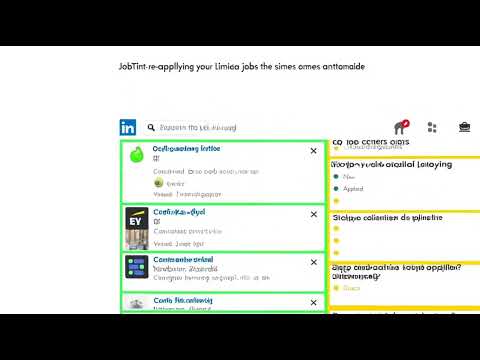
Color-codes LinkedIn job listings by application status. Spot applied, new jobs instantly, no more re-applying by accident.
JobTint — Color-Code Your LinkedIn Job Hunt Tired of scrolling through the same job listings over and over, unsure which ones you've already applied to? JobTint automatically highlights LinkedIn job cards with color so you can see your application status at a glance — no spreadsheets, no second-guessing. How It Works JobTint watches your LinkedIn Jobs feed in real time and color-codes every job card the moment you interact with it: 🟢 Green — Fresh job, not yet applied (Easy Apply available) 🔴 Red — Already applied (tracked automatically) 🟡 Yellow — External application link (redirects outside LinkedIn) The colors persist across sessions. Close LinkedIn, come back tomorrow — your applied jobs are still red. Key Features ✅ Automatic tracking — Applied via Easy Apply? JobTint marks it red instantly, no extra clicks. ✅ External job detection — Spots jobs that take you off LinkedIn and highlights them in yellow before you click. ✅ Undo support — Mistakenly marked a job as applied? Hit the "↩ Undo" button right on the job detail panel to remove it. ✅ Home feed support — Color-coding works on the LinkedIn home page job recommendations too, not just the /jobs/ page. ✅ Zero clutter — No popups, no dashboards, no sign-up. Just subtle color accents on the cards you're already looking at. ✅ Private by design — All data stays in your browser's local storage. Nothing is sent to any server. Why JobTint? The average job seeker applies to dozens of positions over weeks or months. LinkedIn doesn't natively show you which listings you've already opened or applied to in the feed. JobTint fills that gap with a dead-simple visual layer — you'll never accidentally re-apply to the same role or waste time re-reading a listing you've already dismissed. Permissions JobTint requests only: storage — to remember which jobs you've applied to locally on your device Access to linkedin.com/jobs/* — to read and color-code the job cards on the page No personal data is collected. No external requests are made. Everything stays on your machine. Getting Started Install JobTint Go to linkedin.com/jobs Browse jobs as you normally would — the colors appear automatically That's it. No setup required.
0 out of 5No ratings
Details
- Version1.13
- UpdatedMay 2, 2026
- Offered byShivam Tools
- Size23.06KiB
- LanguagesEnglish
- Developer
Email
shivampandey00113@gmail.com - Non-traderThis developer has not identified itself as a trader. For consumers in the European Union, please note that consumer rights do not apply to contracts between you and this developer.
Privacy

JobTint has disclosed the following information regarding the collection and usage of your data. More detailed information can be found in the developer's privacy policy.
JobTint handles the following:
This developer declares that your data is
- Not being sold to third parties, outside of the approved use cases
- Not being used or transferred for purposes that are unrelated to the item's core functionality
- Not being used or transferred to determine creditworthiness or for lending purposes