


Overview
JobTeaser Application Tracker - Centralise your Job search with one click
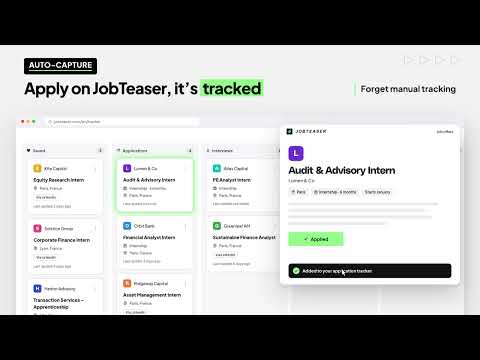
Keep every job application in one place. Save a job from supported career sites directly to your JobTeaser application tracker in one click, without leaving the page. You spot an internship late at night and plan to apply later? By tomorrow you can't find it, and 3 weeks later you can't remember whether you applied or whether they replied. The extension adds a "Save to JobTeaser" button to job pages. Click it and the job appears on your board with the title, company, location, contract type (permanent contract, fixed-term contract, internship, apprenticeship...) and a link to the original ad already filled in. HOW IT WORKS 1. Open a job page on a supported site (LinkedIn, HelloWork, Welcome to the Jungle). 2. Click "Save to JobTeaser"page. 3. The job lands in the Saved column of your board. Move it to Applied, Interviewing or Offer as things happen Jobs you apply to on JobTeaser are added to the same board automatically, so one board covers your whole search. WHAT HAPPENS IF... - You already saved the job: the button shows "On your board" with the job's current stage. It opens your board and doesn't create a duplicate. - The site changed its layout and a field can't be read: a short form opens with the link and title already filled in, so you can finish the save yourself. - You're logged out: click "Sign in to save". After you sign in, the save finishes on its own, and you don't have to find the job again. PRIVACY AND PERMISSIONS - The extension only accesses job related page contentwhen you explicitly click the extension button. It doesn't read the page when it loads or in the background. - The extension works exclusively on supported job pages (Linkedin, Hellowork, Welcome to the Jungle). It cannot view your other tabs, browsing history, or personal data on third-party sit - Your board is private. The extension can't move, edit or delete anything on your board. Recruiters, companies and your school never see it. WHO CAN USE IT The application tracker is available to students whose school offers it on JobTeaser. Sign in with your school's JobTeaser account on Chrome, Edge, Brave or any other Chromium-based browser. If your school doesn't offer it yet, ask your career center. Found a bug, or want us to support another job site? Write to us at support.careercenter@jobteaser.com.
5 out of 51 rating
Details
- Version0.4.0
- UpdatedOctober 9, 2026
- Size426KiB
- LanguagesEnglish
- Developer
- TraderThis developer has identified itself as a trader per the definition from the European Union and committed to only offer products or services that comply with EU laws.
- D-U-N-S260310913
Privacy

JobTeaser Application Tracker has disclosed the following information regarding the collection and usage of your data. More detailed information can be found in the developer's privacy policy.
JobTeaser Application Tracker handles the following:
This developer declares that your data is
- Not being sold to third parties, outside of the approved use cases
- Not being used or transferred for purposes that are unrelated to the item's core functionality
- Not being used or transferred to determine creditworthiness or for lending purposes
Support
For help with questions, suggestions, or problems, visit the developer's support site