


Overview
Field service in your browser: see your JobsiteOn inbox and today's work, get private alerts and open anything in one click.
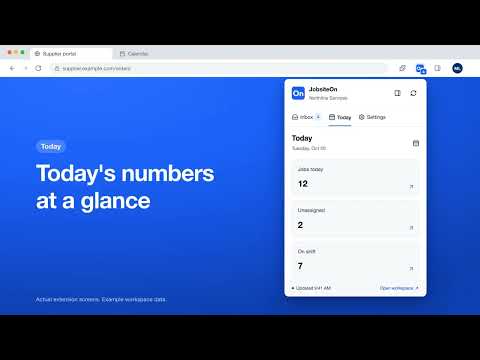
JobsiteOn puts your field service business beside your browser tabs. See new requests, customer messages, tasks and approvals as they arrive, check today's numbers in one click, and open anything in JobsiteOn without hunting for the right tab. JobsiteOn is field service management software for home service businesses. This extension is its Chrome companion, made for owners, office managers and dispatchers who work in the browser while the crews are out. YOUR INBOX, ONE CLICK AWAY Click the JobsiteOn icon in the toolbar, press Alt+Shift+J, or open the side panel to see what is waiting for you: new service requests, customer messages, tasks, approvals, team chat reminders and photo activity from the job site. The toolbar badge counts what arrived since you last looked. Filter the list by Messages, Tasks or Photos, and mark everything seen in one click. TODAY AT A GLANCE The Today tab shows the numbers that matter for your role. Owners see revenue this month, outstanding invoices, pending quotes and active jobs. The office sees today's jobs, unassigned work, technicians on shift and overdue invoices. Technicians see their own jobs for the day and the hours they logged. Every number opens the matching page in JobsiteOn. PRIVATE NOTIFICATIONS Turn on desktop notifications to hear about new activity. Alerts are general on purpose, so customer names and message text never appear on screen. Set quiet hours or pause notifications for an hour. Alerts follow the desktop notification choices you already made in JobsiteOn. OPENS RIGHT WHERE YOU NEED TO BE Click any item or number and it opens that exact request, message, task or job in JobsiteOn on the web, ready for you to act on. SECURE BY DESIGN You sign in on the JobsiteOn website, in a sign-in window that Chrome opens, so the extension never sees your password. Your session stays in Chrome's session storage and ends when Chrome closes. Sign out in the extension, or sign this browser out from the web under Sign-In & Security. The extension does not read other websites or your browsing history. Error reports and usage statistics are off until you turn them on. COMMON QUESTIONS What does this extension do? It shows your JobsiteOn inbox and your daily numbers in Chrome, and can notify you when something new comes in. Do I need a JobsiteOn account? Yes. The extension is a companion to JobsiteOn on the web and signs in with the account you already have. Your workspace plan and role apply, and some features need a paid plan. The extension itself is free, and Apple subscriptions already linked to your workspace are recognized. Can I create quotes, schedule jobs or send invoices in the extension? No. The extension shows and notifies. Clicking anything opens it in JobsiteOn on the web, where you do the work. Does it work for my whole team? Yes. Owners, office staff and technicians each see what fits their role. Technicians do not see financial figures. Will it notify me when Chrome is closed? No. Chrome must be running for background checks, and you sign in again after restarting Chrome. What does it need? Chrome 120 or later, and an internet connection. Support: support@jobsiteon.com Terms of Use: https://www.jobsiteon.com/terms Privacy Policy: https://www.jobsiteon.com/privacy
0 out of 5No ratings
Details
- Version0.10.2849
- UpdatedOctober 18, 2026
- Size144KiB
- LanguagesEnglish (United States)
- DeveloperJobsiteOnWebsite
4848 Lemmon Ave STE 420 Dallas, TX 75219 USEmail
jobsiteon@gmail.comPhone
+1 469-455-0629 - TraderThis developer has identified itself as a trader per the definition from the European Union and committed to only offer products or services that comply with EU laws.
- D-U-N-S144992092
Privacy

JobsiteOn has disclosed the following information regarding the collection and usage of your data. More detailed information can be found in the developer's privacy policy.
JobsiteOn handles the following:
This developer declares that your data is
- Not being sold to third parties, outside of the approved use cases
- Not being used or transferred for purposes that are unrelated to the item's core functionality
- Not being used or transferred to determine creditworthiness or for lending purposes
Support
For help with questions, suggestions, or problems, visit the developer's support site