

Jobber Email Templates

Overview
Save and reuse email templates in Jobber's email dialog
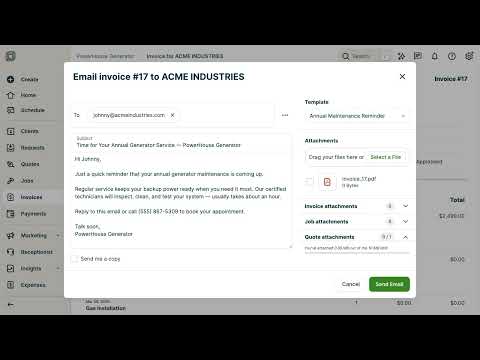
Stop retyping the same email every time you send an invoice or quote. Email Templates for Jobber lets you save your go-to messages and apply them in one click — right inside the Jobber email dialog. How it works: 1. Open any invoice, quote, or job in Jobber and click More Actions → Email. 2. A Template picker appears in the email sidebar — choose a template and your subject and message are instantly filled in. 3. Customize as needed and send. 4. When you write a great new message, click Save as Template (appears automatically when you type something new) to save it in one click — no need to open the extension popup. Free — up to 3 templates, no account needed: - Native-looking dropdown integrates seamlessly into Jobber's UI - Save as Template button appears below the message when you type something new — save directly from the email dialog - Works on invoices, quotes, and jobs - Templates sync across your Chrome profile automatically Pro — unlimited templates for a one-time $9.99: - Save as many templates as you need - Purchase a license code and enter it directly in the extension or email dialog — no subscription, no account - Unlock persists across Chrome profile syncs Perfect for: - Installation invoices - Annual maintenance reminders - Service call follow-ups - Quote follow-ups - Any message you send repeatedly Privacy: Templates are stored in Chrome's built-in sync storage and never leave your browser. When unlocking Pro, your license code is sent to LemonSqueezy solely to verify its validity — no email content, browsing data, or personal information is ever collected.
0 out of 5No ratings
Details
- Version1.4
- UpdatedApril 27, 2026
- Size29.47KiB
- LanguagesEnglish (United States)
- Developer
Email
exceptionraiser@gmail.com - Non-traderThis developer has not identified itself as a trader. For consumers in the European Union, please note that consumer rights do not apply to contracts between you and this developer.
Privacy

This developer declares that your data is
- Not being sold to third parties, outside of the approved use cases
- Not being used or transferred for purposes that are unrelated to the item's core functionality
- Not being used or transferred to determine creditworthiness or for lending purposes