


Overview
Fills LinkedIn Easy Apply forms from your Job Search Bot profile. You always click Submit.
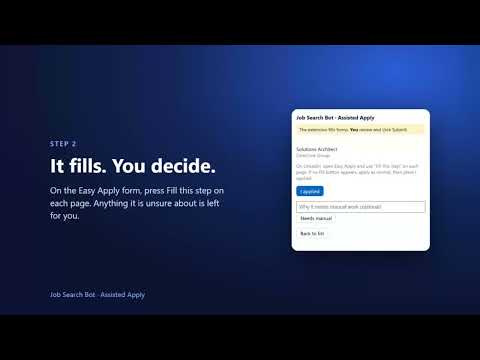
JOB SEARCH BOT - ASSISTED APPLY The companion extension for Autopilot customers of Job Search Bot (jobsearchbot.app/sg). It helps you fill in LinkedIn Easy Apply forms for the jobs you chose to apply to, using the answers you gave us when you signed up. You review everything, and you press Submit yourself. WHO IT IS FOR Job Search Bot is a subscription service for jobseekers in Singapore. Every weekday it searches job boards, scores each role against your resume and emails you a digest. On the Autopilot plan, this extension helps with the repetitive part of applying: typing the same name, phone number, notice period, salary and work-authorisation answers into form after form. You need an Autopilot subscription and the install code from your invite email. Without an install code the extension does nothing. Plans and prices: jobsearchbot.app/sg HOW IT WORKS 1. Link your browser. Click the extension icon and enter the install code from your invite email. 2. Pick a job. The extension lists the jobs you marked Apply in your Google Sheet. Click one to open it on LinkedIn. 3. Fill each page. When LinkedIn's Easy Apply form opens, a "Fill this step" button appears. Press it on each page of the form, and the extension fills the fields it has answers for. 4. Check and submit. Fields it cannot answer are marked in amber so you can answer them yourself. Review every field, then press LinkedIn's own Submit button. 5. It is recorded. When LinkedIn shows its confirmation, the extension records that you applied and your Google Sheet is updated. If a job needs manual work, press "Needs manual" and add a note. If no Fill button appears (for example, a job that applies on the employer's own site), apply as normal and press "I applied". WHAT IT CAN FILL From your sign-up form and profile: name, email, phone number (country code and number), LinkedIn address, location, citizenship, notice period, expected monthly salary, work authorisation and sponsorship status, willingness to relocate, onsite preference, years of experience and education level. A question it has no answer for is left for you. YOU STAY IN CONTROL - It never presses Submit. You send every application yourself. - It fills a form only when you press "Fill this step". - It never reads or stores your LinkedIn or other passwords. - It works only on LinkedIn job pages (www.linkedin.com/jobs) and talks only to Job Search Bot's own server. It does not read any other site. - What is on your screen stays in your browser. The extension does not send the LinkedIn page or its questions to us. YOUR DATA The extension receives your saved answers and your Apply list from our server. It sends us only: the install code you enter once, the extension's version number, and, for each job you finish or flag, the job's row in your Sheet, its web address, the job board, whether you applied or it needs manual work, and any short note you type. It keeps a token in your browser that links it to your account; uninstalling the extension erases it. We do not sell your data and we do not use it for advertising. Full details: https://jobsearchbot.app/sg/privacy (section 10). GOOD TO KNOW - It works on LinkedIn Easy Apply forms only. - Daily limits apply. If you reach one, the extension tells you, and you can mark the rest by hand tomorrow. - If your plan is not active or does not include assisted apply, the extension says so and stops. - This is an early-access release. Some LinkedIn questions may not be recognised, and LinkedIn can change its forms at any time. Anything the extension does not recognise is left for you. - Job boards have their own terms. You use the extension on your own LinkedIn account, and you are responsible for the applications you send. SUPPORT Email job.search.bot.svc@gmail.com. Website: https://jobsearchbot.app/sg/ LinkedIn is a trademark of LinkedIn Corporation. Job Search Bot is not affiliated with or endorsed by LinkedIn.
0 out of 5No ratings
Details
- Version0.1.0
- UpdatedOctober 15, 2026
- Size23.97KiB
- LanguagesEnglish
- DeveloperWebsite
Email
job.search.bot.svc@gmail.com - Non-traderThis developer has not identified itself as a trader. For consumers in the European Union, please note that consumer rights do not apply to contracts between you and this developer.
Privacy

Job Search Bot - Assisted Apply has disclosed the following information regarding the collection and usage of your data. More detailed information can be found in the developer's privacy policy.
Job Search Bot - Assisted Apply handles the following:
This developer declares that your data is
- Not being sold to third parties, outside of the approved use cases
- Not being used or transferred for purposes that are unrelated to the item's core functionality
- Not being used or transferred to determine creditworthiness or for lending purposes
Support
For help with questions, suggestions, or problems, visit the developer's support site