


概述
JIC: A fastest way to copy job details with a simple keyboard shortcut from the large amount of job boards to help you in job search
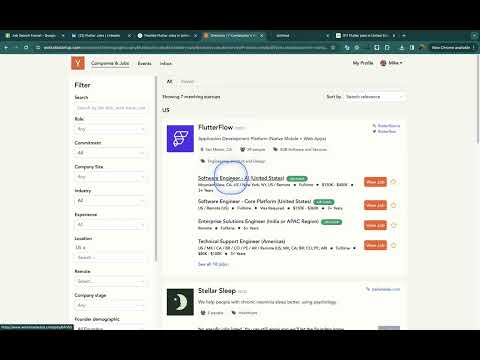
JIC is an Open Source and free browser extension that allows you to very quickly copy detailed info about a job you're about to apply for on: - LinkedIn (https://www.linkedin.com) - Indeed (https://www.indeed.com) - YCombinator (https://www.workatastartup.com) - GlassDoor (https://www.glassdoor.com/Job) Searching for a job can be very tedious. In addition, to have an idea of the success of your efforts, you need to build a search funnel - how many responses were made, how many responses did you get, which company and position did you apply to, how many technical interviews did you have, and how many offers did you end up getting? JIC extension was created to simplify the process of building the funnel! I am a software developer myself and I know from my own experience how much time it takes to put everything in order and not forget anything. At some point I got tired of adding all the data to Google Sheet manually. So I decided to make a simple and effective tool for this task. That's exactly what JobSnap is: simple, fast, and useful. How should you use JIC? Below you will find a link to a Google Sheets template that already has the required fields and automatic formatting set up. You need to copy this file to yourself, and start filling it with data. Then, you find the job you are interested in through the LinkedIn search, respond, press "Ctrl+E" or "Command+E" and all the important information about the position, such a company name, company profile link, job title, position link, salary range, and the current date will be copied to the clipboard. After that you just need to paste it into Google Sheets in a new line. After a while - you will receive rejections or invitations for technical interviews - just fill in the corresponding cell in Google Sheets and get your own success funnel. If the salary is specified in the format "per year" - then this value will simply be copied to the clipboard. If the compensation is specified as "per hour", the clipboard will contain the formula for calculating the annual compensation based on 2080 working hours per year, from which 30 working days are subtracted (you have to rest sometime). Google Sheets Template https://docs.google.com/spreadsheets/d/1VGj09vrj0zQ70QKs-N94lO5LXofafnf6a78pO_7wR1U/edit?usp=sharing My LinkedIn - Feel free to connect with me! https://www.linkedin.com/in/alphamikle/ Source Code of this extension - Put a star if you find the extension useful https://github.com/alphamikle/job_snap JIC Demo https://www.youtube.com/watch?v=ZUVHMMLnJTQ
5 星(5 星制)1 个评分
详情
- 版本1.3
- 上次更新日期2024年3月2日
- 提供方Mike Alfa (Indieloper)
- 大小74.55KiB
- 语言English (United States)
- 开发者Personal
200 S Denver Ave. Tulsa, OK 74103-5019 US邮箱
alphamikle@gmail.com - 非交易者该开发者尚未将自己标识为交易者。欧盟地区消费者须知:消费者权利可能不适用于您与该开发者达成的合约。
隐私权

该开发者已声明,您的数据:
- 不会因未获批准的用途出售给第三方
- 不会为实现与产品核心功能无关的目的而使用或转移
- 不会为确定信用度或放贷目的而使用或转移
支持
若有任何疑问、建议或问题,请在桌面浏览器中打开此页面