


Overview
A powerful word processor with a built-in browser. Write, research and create content side by side. Export to PDF, save locally.
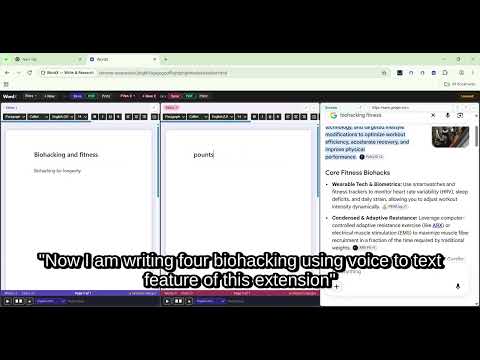
Ever wished you could write and research at the same time without switching tabs? Meet WordX. Update 1.1.9 Two new features — Find & Replace in multiple languages · Read Mode (full screen reading view) Find & Replace Find & Replace works across all languages — type your search term directly, paste text copied from anywhere in the editor, or speak it using voice typing with your active microphone language. Replace one match at a time or replace all at once, instantly. Read Mode Read Mode — distraction-free full screen reading with two-page spread and font size controls. *** *** *** Update 1.1.1 -- The first place where your voice types in your chosen color — speak in red, blue, green or any color instantly. Japanese, Spanish, English, Hindi, Chinese, French, German, Arabic, Russian, Korean, Tamil, Telugu, and more, 21+ languages supported. Documents now save correctly as HTML and PDF with images. Enter key flows naturally to the next page. Write and dictate in color — pick any text color and every character you type or speak appears in that color. *** *** *** Update 1.1.4 UI improved — optional Read Aloud languages, and slim scrollbar. *** *** *** One Use Case - Multilingual writing made simple — Whether you're a student, journalist, or writer — multilingual writing made simple. Optionally use voice to text to dictate in 28+ languages, listen back with Read Aloud, and edit using your device keyboard or voice. No language packs, no special setup — just speak and write. Expand any editor to full width for distraction-free focused writing — one click to expand, one click to return. *** *** *** Update 1.1.0 Documents flow across A4 pages automatically as you type, with page numbers displayed at the bottom of each page and a live page counter in the footer. Read Aloud now has its own dedicated language selector — pick your language and hit play, completely independent of voice input -- with speed control from 0.5x to 2x. Save your document with any file name you choose before it downloads. Open any previously saved WordX file and all pages restore exactly as you left them, ready to continue editing. *** *** *** Screenshot 1 – Voice to Text (Editor 1) + browsing screen including a button above Editor 1 to open Editor 2. Screenshot 2 – Editor 1 with live search on the browsing screen for quick research. Screenshot 3 – Editor 1 + Editor 2 + browsing screen for full multitasking. Screenshot 4 – Editor 1 + Editor 2 setup, useful for writing notes in one editor and creating the final draft in another. Screenshot 5 – Use of expand option when two screens are open for better focus. Users can download their document either as an HTML file or a PDF. Only HTML files can be reopened in the editor for further editing. Once the “New” option is selected, the last open file will be lost. During the session, files are stored locally in Chrome storage, but if you exit without saving, they may be deleted. *** *** *** New features added - WordX now supports voice to text in 21+ languages Click the mic button in the editor and select your language from the dropdown that appears — your words are transcribed instantly in native script. WRITE & EDIT LIKE A PRO Full Word editing — bold, italic, underline, headings, fonts, sizes, lists, alignment and images. Export as PDF, print instantly, or save with any filename and return anytime. RESEARCH WITHOUT LOSING YOUR THOUGHT Browse Google, or many websites right next to your writing. Research and write together — finally. REAL PEOPLE. REAL USE CASES. → Student writing an essay while researching — no more tab switching, no more losing focus → Professional drafting a report while referencing multiple websites simultaneously EXPORT & SHARE Print directly or save as PDF Your documents stay 100% private — saved only on your device, never uploaded anywhere. MORE FEATURES Voice to text · Find & Replace · Session browsing Expand either panel or browser to full width for focused work Simple. Powerful. Everything in one tab. ⚠ Note: Gmail and some sites not working right now.— stay tuned for the next update. *** *** *** The word processor with a live browser built right in — side by side in one Chrome tab. © 2026 WordX. All rights reserved.
0 out of 5No ratings
Details
- Version1.1.9
- UpdatedOctober 15, 2026
- Size39.52KiB
- LanguagesEnglish (United States)
- DeveloperWebsite
Email
mapped.gosearch@gmail.com - Non-traderThis developer has not identified itself as a trader. For consumers in the European Union, please note that consumer rights do not apply to contracts between you and this developer.
Privacy

WordX — Write & Research has disclosed the following information regarding the collection and usage of your data. More detailed information can be found in the developer's privacy policy.
WordX — Write & Research handles the following:
This developer declares that your data is
- Not being sold to third parties, outside of the approved use cases
- Not being used or transferred for purposes that are unrelated to the item's core functionality
- Not being used or transferred to determine creditworthiness or for lending purposes
Support
For help with questions, suggestions, or problems, please open this page on your desktop browser