

AltQ — Send Web Text to AI for ChatGPT, Claude & More
1 rating
)
Overview
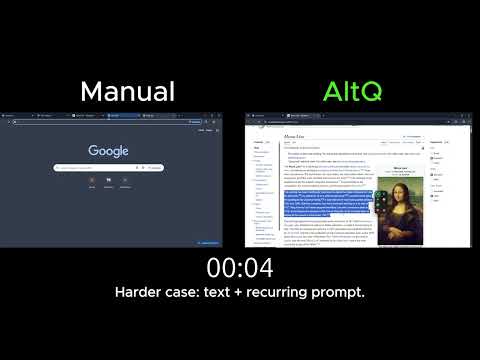
AltQ is a fast AI web clipper. Highlight web text and send it to ChatGPT or Claude instantly. The ultimate web to AI shortcut.
🚀 Stop Tab-Switching and Master Your AI Workflow Are you exhausted by the endless cycle of switching between your active reading tabs and your ChatGPT or Claude windows? Traditional copy-pasting breaks your focus, disrupts your flow state, and forces you to constantly hunt for the right browser tab. Meet AltQ, the ultimate AI web clipper designed for modern productivity. It creates an instantaneous web to AI bridge right inside your browser. Say goodbye to manual clipboard gymnastics and elevate your daily research with a seamless, single-keystroke workflow. 🛠️ Quick Start: How to Use It 1️⃣ Install the extension by clicking the "Add to Chrome" button. 2️⃣ Highlight any text on any webpage — an article, an email, a code snippet, or a PDF document. 3️⃣ Click the AltQ popup icon that appears, or simply press the Alt + Q keyboard shortcut. 4️⃣ Watch your text land directly into your chosen AI chat box, perfectly formatted and ready to process! 5️⃣ Press Alt + W to instantly jump straight back to your original reading tab without losing your spot. Here are 🔟 reasons to make AltQ your primary productivity accelerator: 1️⃣ Frictionless Text Transfer: Eliminate the tedious manual copy-paste routine across multiple browser windows. 2️⃣ Universal Compatibility: Seamlessly integrates with your favorite models, including ChatGPT, Claude, Gemini, and Perplexity. 3️⃣ Keyboard-First Architecture: Execute complex workflows in milliseconds using the highly intuitive Alt + Q and Alt + W hotkeys. 4️⃣ Native Context Menu: Right-click any selected text to push it directly to your preferred neural network. 5️⃣ Zero Screen Clutter: Unlike bulky slide ai tools or obtrusive side panels, our extension remains completely invisible until you actually need it. 6️⃣ Advanced Focus Modes: Choose to automatically jump to the chat tab, or stay on your current page while text sends silently in the background. 7️⃣ Built-In Analytics: Track your efficiency with real-time statistics showing exactly how many minutes you save every single day. 8️⃣ Adaptive Visual Themes: Enjoy polished light and dark modes that automatically sync with your operating system's settings. 9️⃣ Uncompromising Privacy: Zero external servers; your data routing stays entirely localized within your personal browser session. 🔟 Omnipresent Support: Works flawlessly across virtually all websites, including Google Docs, news portals, webmail clients, and local files. 📝 The Ultimate Productivity Paradigm Your time and cognitive energy are your most valuable assets. The extension radically streamlines your daily research, writing, and coding processes by providing a direct pipeline between raw web content and advanced neural networks. Whether you need to summarize lengthy market reports, rewrite professional emails, debug complex code, or translate technical documentation, our AI web clipper handles the mechanical friction so you can focus entirely on creative problem-solving. WHO IT'S FOR Anyone who regularly copies text into an AI chat to summarize, explain, translate, rewrite, or debug it. If you find yourself selecting, copying, switching tabs, and pasting dozens of times a day, this web to AI clipper turns that into a single click or keystroke. Writers, researchers, students, support agents, and developers all use it the same way: select, send, keep working. 🔒 Enterprise-Grade Security & Privacy 🔹 Zero Remote Servers: The extension architecture operates 100% locally within your secure browser environment. 🔹 Direct Data Routing: Your selected text travels directly from your active webpage to the official chat website you selected. 🔹 No Telemetry or Tracking: We absolutely do not track, store, log, or sell your browsing history, clipboard data, or personal information. 🔹 Lightweight Footprint: We require only minimal browser permissions, ensuring zero negative impact on your device's speed, battery life, or security. ❓ Frequently Asked Questions 📌 What exactly is AltQ? 💡 It is a highly optimized AI web clipper extension that empowers you to send selected text directly to neural network interfaces using a single click or keyboard shortcut. 📌 How does the web to AI feature actually work? 💡 Simply highlight any text on your current screen, press Alt + Q or click the floating popup, and the extension automatically pastes the content into your active chat box. 📌 Why should I use this over a sidebar or slide ai extension? 💡 Traditional sidebar or slide ai extensions consume valuable screen real estate and often slow down page rendering. Our solution remains completely invisible until activated, preserving your browser's speed and your visual focus. 📌 Which platforms are currently supported? 💡 The extension is built to fully support the industry's leading platforms, including ChatGPT, Claude, Perplexity, and other prominent web-based chat interfaces. 📌 How do I install and configure the extension? 💡 Just click the "Add to Chrome" button at the top of this page. Once installed, we highly recommend pinning the icon to your browser toolbar for instant access. 📌 Is my sensitive data protected? 💡 Yes! Because the extension runs locally and has no backend server infrastructure, your data is never collected, stored, or transmitted to third-party databases. 📌 Can I operate it entirely without a mouse? 💡 Absolutely! You can disable the visual popup in the settings menu and rely strictly on your Alt + Q and Alt + W keyboard shortcuts for a blazing-fast, hands-free experience. 📌 Is this extension free to download? 💡 Yes, you can install and leverage the core web to AI features to supercharge your daily browsing completely free of charge. 🚀 Elevate Your Digital Experience Today Stop wasting time on repetitive manual tasks. Take control of your workflow and experience the fastest way to interact with artificial intelligence. 👆🏻 Click the Add to Chrome button above and transform the way you browse the web forever!
5 out of 51 rating
Details
- Version7.3.1
- UpdatedOctober 5, 2026
- Offered byaltqextention
- Size129KiB
- Languages7 languages
- Developer
Email
altqextention@gmail.com - Non-traderThis developer has not identified itself as a trader. For consumers in the European Union, please note that consumer rights do not apply to contracts between you and this developer.
Privacy

This developer declares that your data is
- Not being sold to third parties, outside of the approved use cases
- Not being used or transferred for purposes that are unrelated to the item's core functionality
- Not being used or transferred to determine creditworthiness or for lending purposes
Support
For help with questions, suggestions, or problems, please open this page on your desktop browser