


Overview
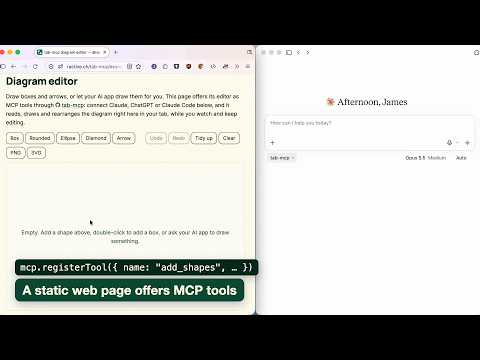
Lets an AI app outside the browser call the WebMCP tools of the page in front and open pages in that tab, through a tab-mcp relay.
Pages can register tools for AI agents with WebMCP (document.modelContext). Chrome offers them to agents inside the browser only. This extension passes the tools of the page in front on to an AI app outside the browser, such as Claude, ChatGPT, Claude Code or Codex, through a tab-mcp relay. Click the extension's icon on a tab to let it read that tab, then turn on AI access in the side panel. It shows an address and a pairing code to add in your AI app. The AI app then sees the page's tools, follows the tab in front and can call them. A tool the page marks read-only runs at once. Every other tool asks you first, in the side panel or in a notification, with the AI app's name, the site and the arguments. You can allow a tool once, or always allow it on that site. The AI app can also open pages in the tab in front: an address, back, forward and reload. On the page's own site this runs at once, as a link on the page would; going to another site asks you first. Each of these answers with the new page's address, title and language. The relay is https://tab-mcp.ractive.ch by default; you can run your own (the relay is open source, MIT) and enter its address in the settings. WebMCP is on in Chrome only where a site takes part in Chrome's origin trial, or after you turn on chrome://flags/#enable-webmcp-testing. The extension reads only tabs you give it, only pages of http(s) sites and no Incognito tabs, and only the page's address, title, language and its WebMCP tools. It sends data only while AI access is on, only to the relay you chose, and only what your AI app asks for. No analytics.
0 out of 5No ratings
Details
- Version0.1.0
- UpdatedNovember 16, 2026
- Size83.14KiB
- LanguagesEnglish
- DeveloperWebsite
Email
james@ractive.ch - Non-traderThis developer has not identified itself as a trader. For consumers in the European Union, please note that consumer rights do not apply to contracts between you and this developer.
Privacy

tab-mcp for Chrome has disclosed the following information regarding the collection and usage of your data. More detailed information can be found in the developer's privacy policy.
tab-mcp for Chrome handles the following:
This developer declares that your data is
- Not being sold to third parties, outside of the approved use cases
- Not being used or transferred for purposes that are unrelated to the item's core functionality
- Not being used or transferred to determine creditworthiness or for lending purposes