

JIRA Agile Instant
평점 18개
)
개요
Useful extension to let you sort, filter, hover for info when using JIRA Agile Board. Getting the info you need at your fingertips…
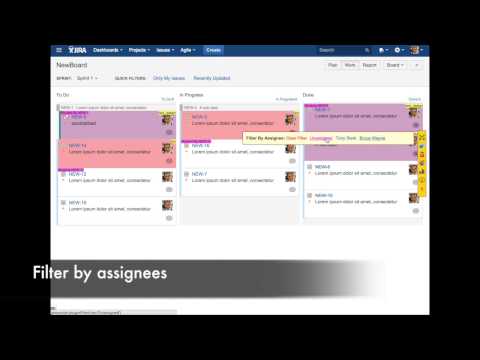
Useful extension to let you sort, filter, hover for info when using JIRA Agile Board. Getting the info you need at your fingertips allows you work quicker and use your time more efficiently. JIRA Instant Agile displays issue details on hover, putting labels and colors on cards for easy scanning, and allows you to sort and filter the cards. Once you installed the chrome extension, a menu bar toggle button is added on the scrum board. Clicking on the toggle button will bring up the menu bar. The features of that menu bar include: Maximize Space (allows you to remove the header of the jira work board) 1 Allows you to see only the issues you are watching (great for story huddles or important issues you care about) 2 Allows you to sort by labels (if your team uses labels on issues) 3 Allows you to sort by assignee 4 Allows you to filter by component (great for teams that organize work by components) 5 Allows you to filter users (great for team members to see what issues are assigned to them without swimlanes) 6 Allows you to filter by priority 7 Allows you to filter by fixed version 8 Allows you to filter by issue type and hide all sub-tasks 9 Allows you to see how many issues are in each status and how many story points are in each status Note: The major plus about that side bar is it manipulates show/hide of data on the screen. You don’t see the the “circle” that jira is loading like you do when you click a quick filter (so they work without refreshing jira). This makes clicking those filter SUPER fast (and if jira is down it will still work if you are on the page already). We made sure the amount of API calls are minimal (data is cached saves them after the first call) so it isn’t a performance hit. Extension can: * Show a hover box when your hover on a card, with description, fix version, last comment, blocked/parent/subtask info. * Display the “Labels” field on the card and automatically color the card. * Display block status on the card. * Add a link on the card to open the issue to a new tab (so it bypasses the side panel) You can click on the "J" button to enable/disable the plugin and go to the configuration page. Usage The plugin works on Work and Plan modes. You can customize the hover and menubar on the options page. For labeling, the plugin only displays labels started with an underscore. This plugin is only tested with JIRA Agile 6.3.x. and 6.4. It may not work for newer version. If this is the case, please leave a feedback.
5점 만점에 4.5점평점 18개
세부정보
- 버전2.0.2
- 업데이트됨2016년 12월 22일
- 제공kelvin hung
- 크기204KiB
- 언어English
- 개발자
이메일
kescape@yahoo.com - 비판매자판매자로 식별되지 않은 개발자입니다. 유럽 연합에 거주하는 소비자의 경우, 이 개발자와 체결한 계약에 대해서는 소비자 권리가 적용되지 않을 수 있음을 유의해야 합니다.
개인정보 보호

지원
질문, 제안 또는 문제와 관련하여 도움이 필요하면 데스크톱 브라우저에서 이 페이지를 여세요.