


Overview
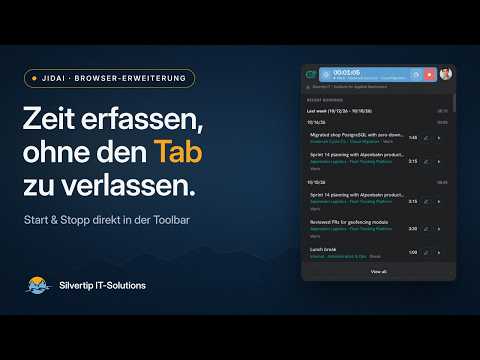
Track work and breaks from the Chrome toolbar. One click to start, a live timer on the icon, and recent bookings grouped by day.
jidAI Time Tracking is the official browser extension for the jidAI time-tracking web app (https://jidai.eu). Start, pause and stop your bookings from the browser toolbar without opening the full web app. Your bookings stay in sync with the web app. What you can do • Start Work in seconds, resume where you left off or pick another live booking type (Break, Training, Business Trip and more) • Project and task are taken from your last booking of that type – change them anytime by editing the running booking • Follow the live timer in the popup while you work; start a break and continue the previous booking afterwards • Stop anytime; edit running or recent bookings (type, project, task, notes, start and end times) or delete them • Browse your recent bookings grouped by week and day, with work-time totals; older weeks load as you scroll; resume a recent booking in one click • Open the jidAI web app, your full booking list or your user settings from the popup • Switch organization if you belong to more than one • Use the extension in English or German; stay signed in across browser restarts Your status at a glance The toolbar icon shows what is running: the jidAI mark when nothing is running, a red record dot while you work, and an amber pause symbol during a break. The running time is shown in the popup. Requirements Requires a jidAI account. How to connect 1. Install the extension and pin it to your browser toolbar. 2. Open the popup and choose Sign in or Create account – or, once you are signed in on https://jidai.eu, use Connect extension there. 3. Confirm the connection in the web app when prompted. 4. Start and stop bookings from the toolbar popup. Permissions and data • Site access is limited to https://jidai.eu/* so the extension can talk to the jidAI web app and API – and no other websites. • "Storage" keeps you signed in and remembers your organization and language; "Alarms" keeps your live booking in sync at regular intervals. • The extension session is independent of the website session: signing out of one does not sign you out of the other. • To clear extension data, remove the extension or clear its storage in your browser's extension settings. Publisher: Silvertip IT-Solutions GmbH, Innsbruck, Austria
0 out of 5No ratings
Details
- Version1.0.7.29
- UpdatedOctober 30, 2026
- Size192KiB
- LanguagesEnglish
- DeveloperSilvertip IT-Solutions GmbHWebsite
Grabenweg 68 Innsbruck 6020 ATEmail
info@silvertip-it.atPhone
+43 664 9111489 - TraderThis developer has identified itself as a trader per the definition from the European Union and committed to only offer products or services that comply with EU laws.
- D-U-N-S300877025
Privacy

jidAI Time Tracking has disclosed the following information regarding the collection and usage of your data. More detailed information can be found in the developer's privacy policy.
jidAI Time Tracking handles the following:
This developer declares that your data is
- Not being sold to third parties, outside of the approved use cases
- Not being used or transferred for purposes that are unrelated to the item's core functionality
- Not being used or transferred to determine creditworthiness or for lending purposes