


Pangkalahatang-ideya
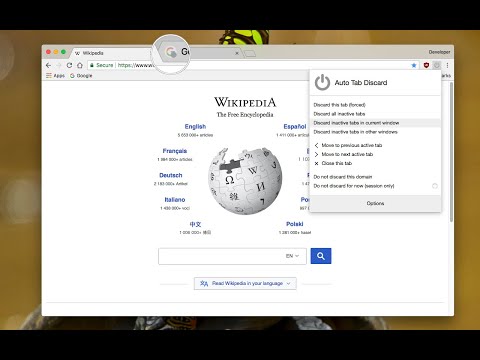
Increase browser speed and reduce memory load when you have numerous open tabs.
"Auto Tab Discard" is a lightweight browser extension that automatically reduces the amount of memory used by open but inactive tabs, helping to conserve battery life on portable devices by disabling JavaScript code and DOM events on discarded tabs. Preview: https://www.youtube.com/watch?v=ityhxUPp3y8 Instruction: There are two options on the extension's interface to either discard tabs or release discarding (the "x" buttons) The features of "Auto Tab Discard" are: * Improves browser performance and reduces memory usage by automatically or manually discarding inactive, idle, or forgotten tabs. * Includes a list of hostnames or regular expressions that can be excluded from auto-discarding. * Preserves the discarded state of tabs when the browser is closed and reopened. * Indicates the discarded state of a tab through the favicon or title. * Restores the state of a tab, including scroll position and text box content, after it is released from being discarded. * Allows for the forced discarding of specified hostnames. The options for configuring whether tabs should be discarded or not include: * Pinned tabs * Tabs that are playing media * The presence of a power source * Unsaved content or user input in a tab The available plugins for "Auto Tab Discard" are: * Release the discarded state of the next or previous tab. * Release the discarded state of all tabs in the active window. * Automatically discard all newly opened inactive tabs. * Store YouTube's timestamp before a tab is discarded. * Permanently delete (remove) old discarded tabs that are inactive. Notes: * Unlike the "The Great Suspender" extension, this extension uses the native method for discarding tabs, which means that even if the extension is removed or the browser crashes, your browser will automatically restore everything for you. Privacy Policy: https://webextension.org/privacy-policy/extension/tab-discard.html
4.2 sa 5353 rating
Mga Detalye
- Bersyon0.6.8.2
- Na-updatePebrero 17, 2024
- Iniaalok ngjoue.quroi
- Laki167KiB
- Mga Wika14 (na) wika
- Developer
Email
joue.quroi@gmail.com - Hindi traderHindi tinukoy ng developer na ito ang sarili bilang trader. Para sa mga consumer sa European Union, pakitandaang hindi naaangkop ang mga karapatan ng consumer sa mga kontrata sa pagitan mo at ng developer na ito.
Privacy

Ipinapahayag ng developer na ito na ang iyong data ay
- Hindi ibinebenta sa mga third party na hindi kabilang sa mga naaprubahang sitwasyon ng paggamit
- Hindi ginagamit o inililipat para sa mga layuning hindi nauugnay sa pangunahing functionality ng item
- Hindi ginagamit o inililipat para tukuyin ang pagiging creditworthy o para sa mga layunin ng pagpapautang
Suporta
Para sa tulong sa mga tanong, suhestyon, o problema, bisitahin ang site ng suporta ng developer