

Twitch Resizer
5 valoraciones
)
Descripción general
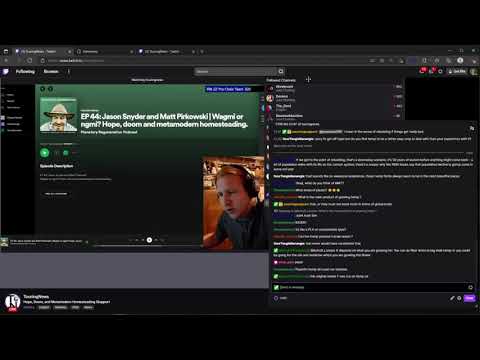
Move and resize chat, video, and follower boxes
This extension allows users to pop out the chat and video elements into movable and resizable boxes so you can interact with the views in your desired visual format. Deleted chats are automatically added back to chat and shown as strike-through text. Unicode emote options. Clicking the eggplant icon will create a small text area where users can search for Unicode emote characters. Clicking the character will copy it to your clipboard. Version 2.14 updates: 1) Bug fixes Version 2.12 updates: 1) Video Pop out is rebuilt and allows multiple streams at once and can be popped out of the window. 2) Chat pop-outs are now available for all followed channels 3) Pop-out followed panel is disabled Version 1.46 updates: 1) minor bug fixes 2) disabled ad blocking Version 1.45 updates: 1) auto-fix Twitch's broken link issue where links are fragmented if they contain non-standard URI. 2) minor bug fixes Version 1.43 updates: 1) added a resize to the top of the video container for when the video resize icon is hidden at the bottom. This occurs when you are on a large and or wide high resolution screen. 2) minor bug fixes 3) ad blocking Version 1.31 updates: 1) Unicode emote options. Clicking the eggplant icon will create a small textarea where users can search for unicode emote characters. Clicking the character will copy it to your clipboard. 2) Usernames with a color similar to the chat window background are changed to green and given a lower font weight. Version 1.21 updates: 1) Users are given pop-out icons as options to convert the element into a moveable and resizable component. 2) Deleted chats are now automatically shown as strike-through text.
3,6 de 55 valoraciones
Detalles
- Versión2.14
- Actualizado23 de septiembre de 2022
- Ofrecido porAndre Bradshaw
- Tamaño146KiB
- IdiomasEnglish (United States)
- Desarrollador
Correo electrónico
andre@quickli.io - No operadorEste desarrollador no se ha identificado como operador. Los consumidores residentes en la Unión Europea deben tener en cuenta que los derechos de los consumidores no son aplicables a los contratos que suscriban con este desarrollador.
Privacidad

Este desarrollador declara que tus datos:
- No se venden a terceros, excepto en los casos de uso aprobados
- No se usan ni se transfieren para fines no relacionados con la función principal del elemento.
- No se usan ni se transfieren para determinar la situación crediticia ni para ofrecer préstamos.