

Fixsay — AI Grammar Fix & Text Rewriter for Chrome

Overview
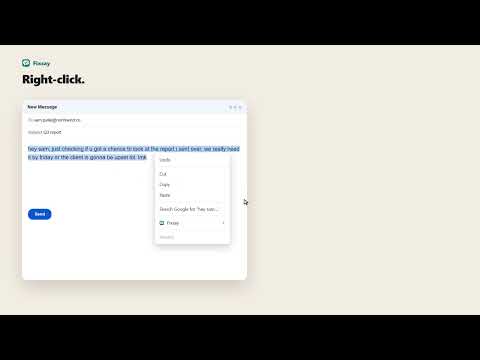
Highlight text, right-click, and fix grammar, rephrase, or change tone. Private, on-device AI or your own key.
Fix grammar, rephrase, and change the tone of any text on the web — right where you're writing. Highlight a sentence in Gmail, LinkedIn, X, Notion, or any comment box. Right-click and choose: • Fix grammar • Rephrase • Make professional / friendly / shorter / clearer • Answer (draft a reply) • Custom instruction The rewrite appears next to your text with changed words highlighted and a clear before/after list. One click to replace. **Private by design** • Use Chrome’s on-device model (no key, text never leaves your computer) • Or bring your own AI key. Some providers let you start for free • No account, no tracking, no servers Works in almost every text box on the web. Alt+Shift+F repeats your last action.
5 out of 51 rating
Details
- Version1.0.20
- UpdatedNovember 10, 2026
- Size75.69KiB
- LanguagesEnglish
- Developer
- Non-traderThis developer has not identified itself as a trader. For consumers in the European Union, please note that consumer rights do not apply to contracts between you and this developer.
Privacy

Fixsay — AI Grammar Fix & Text Rewriter for Chrome has disclosed the following information regarding the collection and usage of your data. More detailed information can be found in the developer's privacy policy.
Fixsay — AI Grammar Fix & Text Rewriter for Chrome handles the following:
This developer declares that your data is
- Not being sold to third parties, outside of the approved use cases
- Not being used or transferred for purposes that are unrelated to the item's core functionality
- Not being used or transferred to determine creditworthiness or for lending purposes
Support
For help with questions, suggestions, or problems, visit the developer's support site