

Breakpoint Remover for Webflow
4 ratings
)
Overview
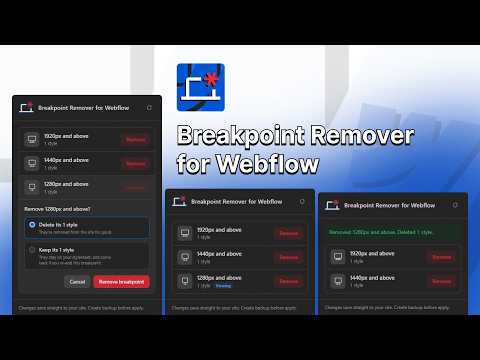
Remove the extra breakpoints (XXL, XL, Large) from your Webflow site, right from the Designer.
Webflow lets you add larger breakpoints to a site, but warns that they cannot be removed once created. Added one by mistake, or no longer need it? Breakpoint Remover for Webflow takes it off your site in a couple of clicks. FEATURES • Lists the large breakpoints on the site you have open, widest first, with the same icons as the Designer's breakpoint bar. • Shows how many styles are set on each breakpoint, and which one you're currently viewing. • Remove 1920px, 1440px or 1280px and above, one at a time, after a confirmation step. • Choose what happens to the styles on that breakpoint: – Delete them (default): they're removed from the site for good. – Keep them: they stop applying, and come back if you add the same breakpoint again. • Moves the canvas to Desktop first if you're viewing the breakpoint you remove. • Tells you exactly what was removed when it's done. HOW TO USE 1. Open your site in the Webflow Designer. 2. Click the Breakpoint Remover icon in the Chrome toolbar. 3. Click Remove next to the breakpoint you want to remove. 4. Choose whether to delete or keep its styles, then click Remove breakpoint. 5. Webflow saves the change automatically. Publish your site to update the live version. GOOD TO KNOW • Changes save straight to your site, so make a backup or duplicate of your site first. • Only the large breakpoints can be removed. Desktop, Tablet and the Mobile breakpoints are never touched. • Interactions set up for a removed breakpoint aren't changed. PRIVACY The extension works only on Webflow Designer pages and only when you open it. Everything happens in your browser: it doesn't collect, store or send any data, and it uses no analytics or tracking. Breakpoint Remover for Webflow is an independent tool and is not affiliated with or endorsed by Webflow, Inc.
5 out of 54 ratings
Details
- Version0.0.1
- UpdatedOctober 26, 2026
- Offered byfrontendcsssimplified
- Size17.22KiB
- LanguagesEnglish
- Developer
Email
frontendcsssimplified@gmail.com - Non-traderThis developer has not identified itself as a trader. For consumers in the European Union, please note that consumer rights do not apply to contracts between you and this developer.
Privacy

This developer declares that your data is
- Not being sold to third parties, outside of the approved use cases
- Not being used or transferred for purposes that are unrelated to the item's core functionality
- Not being used or transferred to determine creditworthiness or for lending purposes
Support
For help with questions, suggestions, or problems, please open this page on your desktop browser