

Domain Age Checker | Website Age Checker

Overview
Instantly check domain age, registration date, and expiry date for any website with a single click.
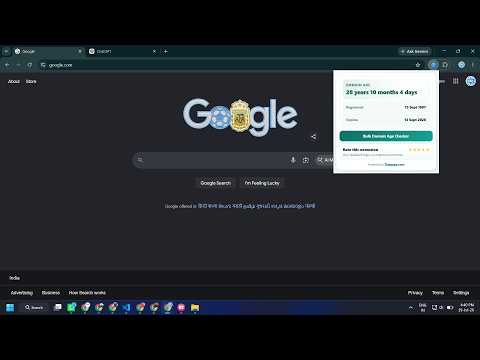
Domain Age Checker – Quick Domain Information While You Browse Want to know how long a domain has been registered? Our Domain Age Checker gives you useful registration information about the website you’re visiting, directly from your browser. There’s no need to copy a URL or open another lookup service. Simply visit a website, click the extension icon, and view the available details in seconds. --How It Works Using the extension is simple: • Install the extension from the Chrome Web Store. • Visit the website you want to check. • Click the extension icon to view its domain information. The current domain is detected automatically, so you don’t need to type or paste anything. --What You Can See -Domain Age: Quickly see how long the domain has been registered. -Registration Date: View the available creation or registration date of the domain. -Expiry Date: Check when the current domain registration is scheduled to expire, when this information is available. All of these details are presented together in a clean and easy-to-read interface. --Built for Quick Checks The extension is designed to keep the process simple. Instead of switching between tabs and manually entering domain names into other services, you can access the information while staying on the website you’re browsing. There are no complicated settings to configure and no account is required. --Wide Domain Support The extension works with a wide range of popular and country-specific domain extensions. The amount of information available may vary between domains because registration data depends on what is provided by the relevant registry or data source. --Useful for Domain Research Domain registration information can be helpful when researching an unfamiliar website, reviewing a domain, comparing different sites, or simply finding out how long a particular domain has existed. You can get the basic details you need without interrupting your normal browsing experience. --Need to Check Multiple Domains? If you have several domains to check, you can also use our free online Domain Age Checker: https://dotpapa.com/domain-age-checker/ The online version provides a convenient option when you need to perform multiple domain checks. --Frequently Asked Questions Q: How do I check a domain? A: Visit the website and click the extension icon. The current domain will be detected automatically and its available information will be displayed. Q: What information does the extension show? A: It can display the domain age, registration date, and expiry date based on the information available for that domain. Q: Do I need to enter the domain manually? A: No. The extension automatically uses the domain of the website currently open in your browser. Q: Do I need an account? A: No. You can use the extension without creating an account or completing a sign-up process. Q: Does it work with every domain extension? A: A wide range of domain extensions are supported. However, the availability of individual registration details can vary depending on the domain and its registry.
4.9 out of 517 ratings
Details
- Version1.4.1
- UpdatedJuly 22, 2026
- Size169KiB
- LanguagesEnglish
- Developer
- Non-traderThis developer has not identified itself as a trader. For consumers in the European Union, please note that consumer rights do not apply to contracts between you and this developer.
Privacy

This developer declares that your data is
- Not being sold to third parties, outside of the approved use cases
- Not being used or transferred for purposes that are unrelated to the item's core functionality
- Not being used or transferred to determine creditworthiness or for lending purposes
Support
For help with questions, suggestions, or problems, please open this page on your desktop browser