


Overview
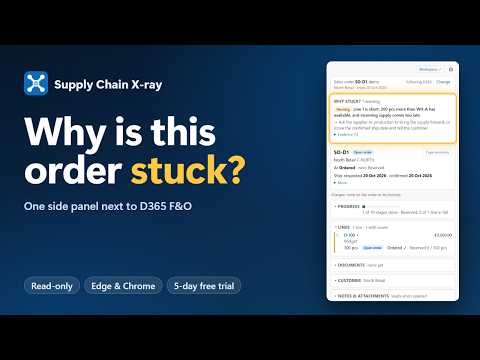
Read-only X-ray of sales, purchase, production, transfer and return orders in Dynamics 365 F&O: every stage, and why it is stuck.
Supply Chain X-ray shows why an order in Microsoft Dynamics 365 Finance & Operations is stuck, in a side panel next to the D365 page you are working in. Where you would normally open six to ten forms to answer "where is my order?", the side panel answers it on one screen: which stage each order line has reached, which documents exist, and what holds the order up. Every finding comes with the evidence behind it and the next step to take, in plain language. WHO IT IS FOR Order desk and customer service, planners, buyers, production and warehouse supervisors, and finance teams who work in D365 F&O every day. WHAT IT SHOWS - Sales orders: holds and credit, a ten-stage timeline from ordered to paid, every line with inventory, loads and work. It also flags lines changed since the customer's confirmation, prices below the trade agreement, and why a reserved order isn't released to the warehouse yet. And what D365 itself refuses: an item stopped at the site or blocked by its lifecycle state, a stopped line, why release or ship confirm is refused, a missing VAT number or a closed ledger period. - Purchase orders: approval, vendor responses and changes since confirmation, the purchase requisition behind each line, receipts outside the delivery tolerance, lines closed short, posted invoices, and pending invoices with D365's own matching result. And why it is stuck: invoice posting failed, the vendor or invoice account on hold, a stopped line, registered but not received, intercompany direct delivery or a closed ledger period. - Production and batch orders: materials, operations, outputs and co-products, estimated versus realised cost, jobs open too long, shop floor registrations not yet transferred, and batch attributes out of tolerance. And why an order is stuck: reported in full but still started, End refused, material not at the input location, a release that needs full reservation, a stopped item or locked scheduling. - Transfer orders: shipping, transit and receiving, with warehouse work and loads, and why a transfer is stuck: load shipped but the shipment not posted, registered but not received, picked but not shipped, the fulfillment policy, and the sales orders it holds up. - Return orders: arrival, disposition, credit and replacement, per line, including a credit at another price than the original invoice and more returned than was sold, and why a return is stuck: customer on hold, a replacement shipped before the goods came back, put-away open or processing stopped. - Warehouse work on the order: why no work was created after the wave, and open work no mobile device menu item can pick up, for sales, transfer and production orders. - Batch and serial trace: where a batch came from and where it went, also through production, with batch attributes and a customer list for a recall as a CSV file. - When can I deliver?: usable stock now and every open receipt and issue as a running balance per warehouse, and forecast against actual sales per item. - Agreements, notes and attachments: what an order has used of its sales or purchase agreement, and which notes and attachments it has (their names only; files are never opened). - Linked orders: follow an order to its purchase, production or transfer order, also across companies. THE WORKSPACE A full page that looks across all open orders and the stock behind them: exceptions ranked by urgency, availability and shortages, planned orders and delayed planned orders, production orders ready to start, master data problems, customer on-time-in-full, vendor performance, credit and holds (including temporary credit limits), purchase requisitions, agreements about to expire, open returns, quality orders, and a month-end check. For the warehouse: open work, stuck loads, unposted journals, counting accuracy, stock left behind, locked work and picks waiting on replenishment, plus a check of the warehouse management setup itself, such as work no mobile menu item can process and location directives that find no location. Every list has filters, a summary to copy into an email and a CSV export. HOW TO USE IT Open D365 and click the Supply Chain X-ray icon, or press Alt+Shift+O. The panel follows the order you are looking at. Select any order, item or batch number in D365 and press Alt+Shift+L to open it in the panel. Requires Microsoft Edge or Google Chrome 116 or later and access to a D365 Finance & Operations environment. READ-ONLY AND PRIVATE - The extension never changes data in D365. It only sends read requests to D365's own OData service, with your own session, so your D365 security roles apply to everything it shows. - D365 data is processed in your browser. No orders, items, customers, vendors, quantities or amounts are ever sent to Scan It Labs or to anyone else. - No analytics, no telemetry and no remote code. - The only connection outside D365 is the licence check with licence.pwscanit.com. It sends only your email address, the licence key or sign-in code, the product and version, a random install id, the D365 environment host name and the licence token. TRIAL AND LICENCE Supply Chain X-ray is a paid product. Every plan starts with a free 5-day trial that you start in the extension with your email address, with no payment details. After the trial you can buy a licence on pwscanit.com, per user or for a team in one D365 environment. One Scan It Labs licence unlocks every Scan It Labs extension for D365 F&O: Supply Chain X-ray, Config Diff, Security X-ray and CMR consignment note. Plans and prices are on the website. A paid licence includes the user manual, which explains every screen, every check and the D365 data each one reads. SUPPORT Questions or problems: support@pwscanit.com, or https://pwscanit.com/support/. We answer within one business day. Supply Chain X-ray is made by Scan It Labs (PW Scan IT BV). It is not made or endorsed by Microsoft.
0 out of 5No ratings
Details
- Version1.2.0
- UpdatedOctober 29, 2026
- FeaturesOffers in-app purchases
- Size553KiB
- LanguagesEnglish
- DeveloperPw Scan ItWebsite
Panterstraat 1 Roeselare 8800 BEEmail
support@pwscanit.comPhone
+32 479 33 73 62 - TraderThis developer has identified itself as a trader per the definition from the European Union and committed to only offer products or services that comply with EU laws.
- D-U-N-S372954252
Privacy

Supply Chain X-ray has disclosed the following information regarding the collection and usage of your data. More detailed information can be found in the developer's privacy policy.
Supply Chain X-ray handles the following:
This developer declares that your data is
- Not being sold to third parties, outside of the approved use cases
- Not being used or transferred for purposes that are unrelated to the item's core functionality
- Not being used or transferred to determine creditworthiness or for lending purposes
Support
For help with questions, suggestions, or problems, please open this page on your desktop browser