

Inkaret

Overview
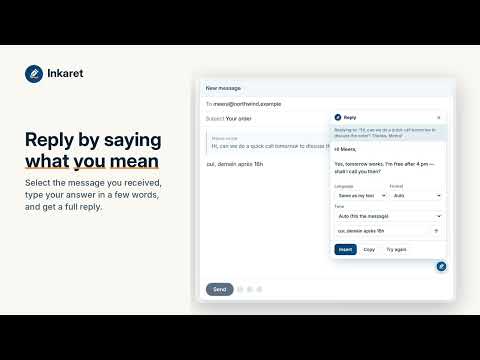
Type rough notes in your own language. Inkaret writes the full message, in any text box.
You think in your own language. Inkaret writes it. Inkaret puts a small pen in the text boxes you already use — email, chat, forms. Type a few rough notes in any language, or a mix of two, and Inkaret writes the full message for you, ready to send. WHAT IT DOES - Write — rough notes in, full message out. Notes can be in Spanish, Hindi, Arabic, French or any other language; the message comes out in the language you choose. - Reply — select the message you received, type your answer in a few words, and get a complete reply. - Correct — fix spelling and grammar without changing your words. - Rephrase and Shorten — say it more clearly, or in half the length. - Change tone — friendly, professional, formal, casual and more. - Notes for the AI — ask for a change ("warmer", "mention the refund") and Inkaret reworks what is on screen. MADE FOR PEOPLE WHO WRITE IN A SECOND LANGUAGE A mix of languages stays a mix when you want it to, and becomes one clean language when you ask. You never have to translate in your head first. PRIVATE BY DESIGN - Nothing you write is stored on our servers. - Card numbers, government ID numbers, phone numbers and email addresses are hidden before the AI sees your text, then put back in the result. - Inkaret reads a text box only when you click the pen or pick an action. It never reads pages in the background. - Password, card and one-time-code fields are never touched. - Hide the pen on any site with one click. HOW TO START 1. Install and click the Inkaret button. 2. Sign in on inkaret.com with your email (no password). 3. Click the pen in any text box. Inkaret is in an invite-only beta. Request access at https://inkaret.com Support: https://inkaret.com/contact/
0 out of 5No ratings
Details
- Version0.0.1
- UpdatedOctober 10, 2026
- Offered byMicronstars
- Size227KiB
- LanguagesEnglish
- Developer
Email
ReyStarCom@gmail.com - Non-traderThis developer has not identified itself as a trader. For consumers in the European Union, please note that consumer rights do not apply to contracts between you and this developer.
Privacy

Inkaret has disclosed the following information regarding the collection and usage of your data. More detailed information can be found in the developer's privacy policy.
Inkaret handles the following:
This developer declares that your data is
- Not being sold to third parties, outside of the approved use cases
- Not being used or transferred for purposes that are unrelated to the item's core functionality
- Not being used or transferred to determine creditworthiness or for lending purposes