


Overview
AI interview assistant: real-time answers in live interviews + mock interview practice from your resume & job. subcue.ai
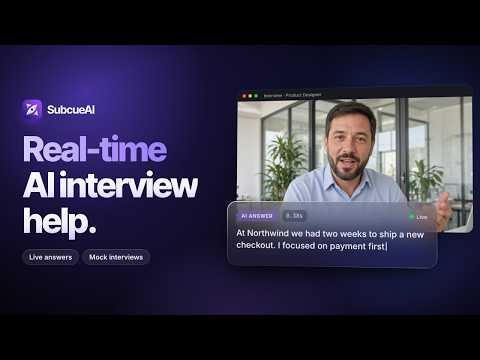
SubcueAI - AI Interview Assistant helps you two ways: real-time answer suggestions during live interviews that run in your browser, and realistic mock-interview practice built from YOUR resume and YOUR target job. LIVE INTERVIEW ASSIST When your interview runs in a browser tab (Google Meet, Zoom on the web, Microsoft Teams on the web, and similar), open the side panel and press Start. SubcueAI listens to the interviewer through the tab's audio, transcribes each question in real time, and — on your command — streams a suggested answer you can put into your own words. • Reads the interviewer from tab audio only — it never captures your microphone • Press Generate (or a keyboard shortcut) to get a tailored answer for the current question • Answers stream live in a side panel that rides beside your call • Page through earlier answers with the ← / → keys • Set the interviewer's language and your answer language independently • Drag to resize the transcript / answer split MOCK INTERVIEW PRACTICE Rehearse before the real thing. SubcueAI plays the interviewer: it generates personalized questions from your resume and target job, speaks them out loud, listens to your spoken answer (or lets you type), and asks follow-ups based on what you actually said — just like a real hiring manager. • Personalized questions from your actual resume and the job you're targeting, not a generic bank • Adaptive follow-ups that drill into your previous answer • Voice-first: the interviewer speaks; answer hands-free or by typing • End a session for the full transcript and scored AI feedback on subcue.ai HOW IT WORKS 1. Sign in with your SubcueAI account (free to create — new accounts include free credits) 2. Add your resume and target job at subcue.ai (the built-in resume builder is free) 3. Mock: pick a language and start — one spoken question at a time, with follow-ups 4. Live: open the side panel on your interview tab, press Start, and Generate answers on demand 5. Review the full transcript and AI performance analysis on subcue.ai LANGUAGES 27 interview languages, with the interface localized in 27 languages too. In live assist you can set the interviewer's spoken language and your answer language separately. WHAT YOU NEED A free SubcueAI account (subcue.ai). Live assist works for interviews that play through a Chrome tab. Generating questions and answers uses account credits; live transcription is billed by the minute; new accounts start with free credits. Your resume and job descriptions are managed in your SubcueAI dashboard, where the free resume builder powers the personalized questions. PRIVACY Audio is captured only after you press Start. In live assist it comes only from the tab you choose — never your microphone, never other tabs, never your desktop. In mock practice your microphone is used only when you choose to answer by voice. Audio is sent to the SubcueAI API solely to transcribe speech and generate your questions, answers, and transcript — it is not sold or used for anything else. Privacy policy: https://subcue.ai/privacy MORE FROM SUBCUEAI Interviewing in a native desktop app instead of the browser? The SubcueAI desktop app for macOS and Windows gives you the same real-time assist system-wide. Get it at https://subcue.ai
0 out of 5No ratings
Details
- Version2.4.3
- UpdatedSeptember 29, 2026
- Size164KiB
- Languages28 languages
- DeveloperSubcue AI LLCWebsite
1007n Orange Street 4th floor suite 5580 Wilmington, DE 19801 USEmail
aaron@subcueai.comPhone
+1 302-230-6860 - TraderThis developer has identified itself as a trader per the definition from the European Union and committed to only offer products or services that comply with EU laws.
- D-U-N-S145020950
Privacy

SubcueAI - AI Interview Assistant has disclosed the following information regarding the collection and usage of your data. More detailed information can be found in the developer's privacy policy.
SubcueAI - AI Interview Assistant handles the following:
This developer declares that your data is
- Not being sold to third parties, outside of the approved use cases
- Not being used or transferred for purposes that are unrelated to the item's core functionality
- Not being used or transferred to determine creditworthiness or for lending purposes
Support
For help with questions, suggestions, or problems, visit the developer's support site