

ReviewGenie – AI Code Review, Architecture Diagrams & Jira Ticket Generator

Overview
AI architecture co-pilot: reviews design docs, generates Jira tickets, diagrams, security scans & test plans. BYOK.
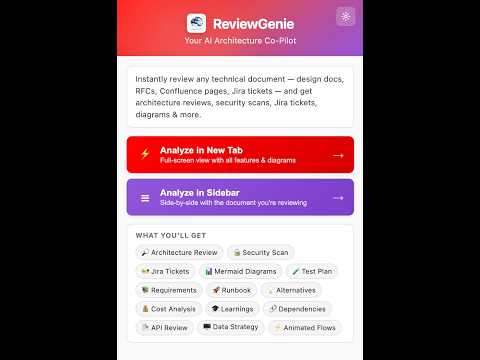
ReviewGenie turns any technical document — design docs, RFCs, PRDs, architecture specs — into a production-ready engineering blueprint in seconds. Works on Confluence, Notion, GitHub wikis, internal docs, and even localhost previews. Stop copy-pasting design docs into ChatGPT. ReviewGenie lives in your browser as a Chrome side panel and reviews technical docs against industry best practices using the AI provider you already pay for (OpenAI, Anthropic Claude, Azure OpenAI, or any custom endpoint). ━━━━━━━━━━━━━━━━━━━━━━━━━━━━━━━━━ WHAT REVIEWGENIE DOES ━━━━━━━━━━━━━━━━━━━━━━━━━━━━━━━━━ 📊 Document Maturity Score Get an instant 0–100 readiness score with a gap list — know what's missing before review. 🏗️ Architecture & API Review Detects unstated edge cases, missing NFRs, weak failure modes, and API design smells (REST naming, status codes, versioning, idempotency). 🧱 Jira Tickets & Task Breakdown Auto-generates Epics → Stories → Tasks with Given-When-Then acceptance criteria, broken down by Development / Observability / Testing pillars. Copy straight into Jira. 🔐 Security & Secret Scan Flags hardcoded API keys, tokens, certificates, and threat vectors (auth gaps, missing rate limits, insecure transport, OWASP LLM Top 10 risks). 🧪 Test Plan Generator Produces system test strategy plus a granular scenario matrix: functional, negative, boundary, and failure paths. 📐 Mermaid Diagrams Turns architecture prose into rendered Mermaid sequence diagrams, flowcharts, and component maps — right inside the side panel. 🔗 Data Lineage / OpenLineage Export Parses embedded SQL and dataflow descriptions into OpenLineage-compatible JSON for DataHub, Marquez, and other catalog tools. ✨ Optimized "Better Version" Draft Rewrites your doc with all gaps closed, side-by-side with the original, ready to paste back into Confluence. 💬 Conversational Override Disagree with the AI? Tell it "we use SQS, not Kafka" or "scope this to a 2-week MVP" and the entire ticket tree, test plan, and blueprint regenerate to match. ━━━━━━━━━━━━━━━━━━━━━━━━━━━━━━━━━ WHY ENGINEERS PICK REVIEWGENIE ━━━━━━━━━━━━━━━━━━━━━━━━━━━━━━━━━ ✅ Bring Your Own Key — OpenAI, Anthropic, Azure OpenAI, or any custom HTTPS endpoint. No vendor lock-in. ✅ Zero backend — your documents go directly from your browser to your AI provider. We never see them. ✅ Zero telemetry — no analytics, no tracking, no account required. ✅ Works on Confluence, Notion, GitHub wikis, internal documentation portals, and localhost previews. ✅ Native Chrome side panel + right-click context menu + popup. ━━━━━━━━━━━━━━━━━━━━━━━━━━━━━━━━━ WHO IT'S FOR ━━━━━━━━━━━━━━━━━━━━━━━━━━━━━━━━━ • Staff & Principal Engineers running RFC and design reviews • Engineering Managers shipping faster sprint planning • Architects enforcing API and NFR standards across teams • QA leads designing test strategies from specs • SecOps reviewing designs for security gaps • Product Managers turning PRDs into engineering-ready tickets ━━━━━━━━━━━━━━━━━━━━━━━━━━━━━━━━━ HOW TO GET STARTED (60 SECONDS) ━━━━━━━━━━━━━━━━━━━━━━━━━━━━━━━━━ 1. Install ReviewGenie. 2. Click the extension icon → Settings → paste your OpenAI / Anthropic / Azure API key. 3. Open any technical document (Confluence page, Notion doc, GitHub README, RFC, design spec) → click "Analyze Page" or right-click → "Analyze with ReviewGenie". 4. Review the maturity score, gaps, Jira tickets, security findings, test plan, and diagrams in the side panel. ━━━━━━━━━━━━━━━━━━━━━━━━━━━━━━━━━ PRIVACY-FIRST DESIGN ━━━━━━━━━━━━━━━━━━━━━━━━━━━━━━━━━ ReviewGenie has no server. Your API key and settings live in chrome.storage.local on your machine only. Page content is sent directly to the AI provider you configure — never to us. Full policy linked in the privacy section of this listing. Install ReviewGenie, point it at a design doc, and turn an hour of manual review into a one-click engineering blueprint.
0 out of 5No ratings
Details
- Version1.0.0
- UpdatedJune 20, 2026
- Offered byRaghunandan
- Size1.71MiB
- LanguagesEnglish
- Developer
Email
raghunitb@gmail.com - Non-traderThis developer has not identified itself as a trader. For consumers in the European Union, please note that consumer rights do not apply to contracts between you and this developer.
Privacy

This developer declares that your data is
- Not being sold to third parties, outside of the approved use cases
- Not being used or transferred for purposes that are unrelated to the item's core functionality
- Not being used or transferred to determine creditworthiness or for lending purposes