


Overview
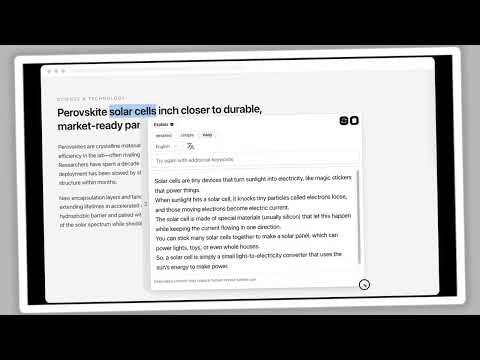
Select text on any page to rewrite, translate, or explain it with ThatGPT
ThatGPT helps you rewrite, translate, and explain text without leaving the page. Select text on a website. A small assistant appears next to your selection. Choose Rewrite, Translate, or Explain, then use the result in place. 💪 Rewrite Turn selected text into a clearer version. Choose Casual, Business, or Academic, then pick a suggestion to replace the original in editable fields. 💪 Translate Translate selected text into English, Spanish, French, German, Chinese, Japanese, or Korean. 💪 Explain Get a simple, detailed, or easy-to-follow explanation of the selected text. Add extra context when you need a more specific answer. ● How to use 1️⃣ Install ThatGPT, pin it from the puzzle menu in the toolbar, then sign in or sign up with your email in the side panel. 2️⃣ Open any https page and select the text you want to work with. 3️⃣ Choose Rewrite, Translate, or Explain. 4️⃣ Review the result. For rewrites, select a suggestion to replace the text. ● Account and acorns ThatGPT uses acorns as credits. Each AI request spends acorns from your account. Buy more acorns whenever you need them. ● Notes - AI output can be inaccurate. Check anything important before you use it. - The extension UI is in English. Translation output can be in other languages.
5 out of 51 rating
Details
- Version1.1.0
- UpdatedOctober 26, 2026
- FeaturesOffers in-app purchases
- Size304KiB
- LanguagesEnglish (United States)
- DeveloperEmklaudWebsite
18 King Street East Suite 1400 Toronto, ON M5C 1C4 CAEmail
support@emklaud.comPhone
+1 647-847-0423 - TraderThis developer has identified itself as a trader per the definition from the European Union and committed to only offer products or services that comply with EU laws.
- D-U-N-S243372114
Privacy

ThatGPT: Smart Read & Write with AI has disclosed the following information regarding the collection and usage of your data. More detailed information can be found in the developer's privacy policy.
ThatGPT: Smart Read & Write with AI handles the following:
This developer declares that your data is
- Not being sold to third parties, outside of the approved use cases
- Not being used or transferred for purposes that are unrelated to the item's core functionality
- Not being used or transferred to determine creditworthiness or for lending purposes