

Autofill Taobao Tracking No. & Shipping Info

Overview
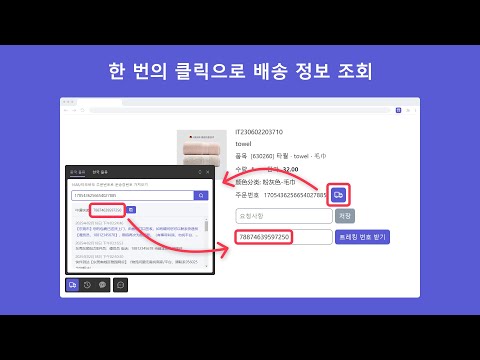
One click to copy product and package info from Taobao
Key features: 1. Get tracking numbers with one click Method 1: Automatic lookup Click the 【Get Tracking Number】 button to automatically retrieve the tracking number. You can also look up tracking numbers in bulk for all orders on the page. Support is currently available for some Korean freight forwarding websites, including quickstar, asap-china and zh8g. Method 2: Manual lookup On the order list page, click the order recognition button in the 【Track Package】 icon at the bottom left to look up tracking numbers for all orders on the current page at once. You can also copy and paste order numbers manually to look them up. 2. Copy and paste order details Copy order details from Taobao and 1688, or recipient information from Coupang, and paste them into the order page on a freight forwarding website. 3. Customize pasted order details Choose which fields appear in the paste area. Video tutorial: https://www.youtube.com/watch?v=o-q912HSLng If you have any questions or suggestions, please contact us: https://www.aliprice.com/information/index/page/contact
4.9 out of 5321 ratings
Details
- Version3.0.7
- UpdatedNovember 24, 2026
- Size2.94MiB
- Languages6 languages
- DeveloperWebsite
Email
hui.song@aiprice.com - Non-traderThis developer has not identified itself as a trader. For consumers in the European Union, please note that consumer rights do not apply to contracts between you and this developer.
Privacy

Autofill Taobao Tracking No. & Shipping Info has disclosed the following information regarding the collection and usage of your data. More detailed information can be found in the developer's privacy policy.
Autofill Taobao Tracking No. & Shipping Info handles the following:
This developer declares that your data is
- Not being sold to third parties, outside of the approved use cases
- Not being used or transferred for purposes that are unrelated to the item's core functionality
- Not being used or transferred to determine creditworthiness or for lending purposes
Support
For help with questions, suggestions, or problems, please open this page on your desktop browser