

Snaptab
1 rating
)
Overview
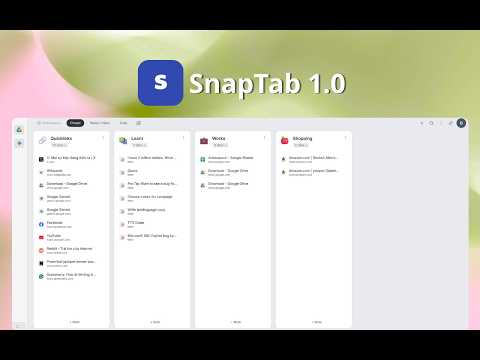
Organize your tabs with a modern Kanban-style interface.
🚀 Snaptab – Transform Your New Tab into a High-Speed Command Center Snaptab turns every new tab into an intelligent dashboard, allowing you to manage, save, and organize your digital life in a flash. Say goodbye to tab clutter and browser lag—experience a workspace that is organized, scientific, and RAM-optimized. With a flexible drag-and-drop system, you can effortlessly save tabs, create groups, or build dedicated workspaces. One "snap" is all it takes to bring order to the chaos. Plus, with seamless cross-device synchronization, your workflow stays consistent no matter where you are. 🧠 Integrated Note-Taking – Manage Tasks Directly in Your Tab Snaptab does more than just save links; it empowers your productivity: Quick Notes: Attach thoughts or reminders to specific websites. Omnipresent Sticky Notes: Access a notepad popup on any page you visit. Never lose a brilliant idea, an important article, or a critical task ever again. ⚡ Performance Optimized – Accelerate Your Browsing Snaptab is engineered to: Reduce Memory Footprint: Smartly close and archive inactive tabs to free up RAM. Keep Browsing Fluid: Maintain a lightweight and responsive browser environment. Focus on What Matters: Eliminate the stress of managing chaotic windows. Bid farewell to messy bookmarks, overlapping windows, and the "too-many-tabs" syndrome. 🔥 Key Features ✔︎ Multi-Window Management: Save and organize tabs across all open windows. ✔︎ Our Hidden Folders feature provides complete privacy for your sensitive data. ✔︎ Smart Workspaces: Group tabs by category or project. ✔︎ Built-in Notes: Capture ideas without leaving your current page. ✔︎ Global Popup Notes: Floating notepad available on any website. ✔︎ Cloud Sync: Access your data across all your devices. ✔︎ Web Snippets: Save highlighted text instantly. ✔︎ Deep Search: Quickly find any saved content. ✔︎ UI Customization: Dark and Light modes for visual comfort. ✔︎ Data Export: Easily share your curated collections with others. ✔︎ Personalization: Customize categories with icons and emojis. 🎁 Get Started for Free Experience the full power of Snaptab as a guest or with a free account. All premium features are unlocked for your first 50 saves. Version 1.2.1 brings major usability improvements to Snaptab. This update adds flexible tab grouping with drag tabs in and out of groups, undo after grouping, and restore items back to their original positions. It also introduces per-column todo lists, a preferred quick-save column with Ctrl+Shift+S, editable saved tab titles, improved favicon syncing across browsers, better avatar support, and more complete localization for quick-save popups and note pages. We also fixed several important issues, including notes not deleting correctly, saved data not showing immediately after login on a new browser, PRO and TEAM users incorrectly hitting the 50-item limit, category/column sync issues after refresh, and multiple drag-and-drop problems related to grouped tabs. 💬 Feedback & Support We are constantly evolving to make Snaptab faster, stronger, and smarter. Your feedback is the engine behind our daily improvements. Reach out to us via our support email or the in-app chat system.
5 out of 51 rating
Details
- Version1.2.13
- UpdatedSeptember 16, 2026
- FeaturesOffers in-app purchases
- Offered byAli33.site
- Size307KiB
- LanguagesEnglish
- Developer
Email
tuananhnguyen44@gmail.com - Non-traderThis developer has not identified itself as a trader. For consumers in the European Union, please note that consumer rights do not apply to contracts between you and this developer.
Privacy

Snaptab has disclosed the following information regarding the collection and usage of your data. More detailed information can be found in the developer's privacy policy.
Snaptab handles the following:
This developer declares that your data is
- Not being sold to third parties, outside of the approved use cases
- Not being used or transferred for purposes that are unrelated to the item's core functionality
- Not being used or transferred to determine creditworthiness or for lending purposes
Support
For help with questions, suggestions, or problems, please open this page on your desktop browser