


Overview
Clip products from any supplier website directly into Planify - in one click
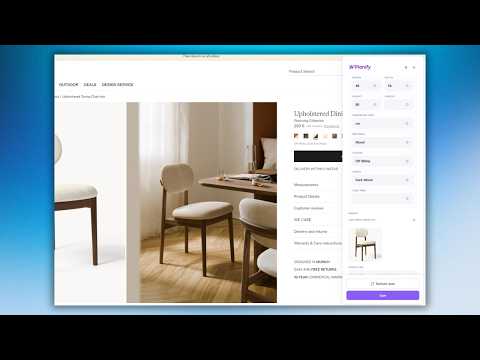
Planify Web Clipper is a browser extension built for interior designers and architects using Planify - the project management platform for design professionals. Instead of manually copying product names, prices, dimensions, and URLs from supplier websites into your projects, the Clipper does it for you in one click. HOW IT WORKS 1. Browse any supplier or vendor website 2. Click the Planify Clipper icon in your toolbar 3. A sidebar opens with product data pre-filled (name, price, dimensions, image, URL) 4. Save the product to your Favorites or directly into a Project board - Inspirations, Mood Board, Review, or Materials 5. The product is saved to your Planify account instantly EDITING EXTRACTED DATA Not happy with what was auto-filled? You can edit any field by simply typing over it - or use the target icon to point at a different element on the page and re-extract just that field. Pick a different image, grab a different price variant, or correct a dimension without re-clipping the whole product. SMART PAGE DETECTION If you have the Clipper open and navigate to a new product page, the extension detects the change and asks whether you want to fetch data for the new product - no need to reopen the sidebar manually. WHAT GETS EXTRACTED - Product name - Price and currency - Dimensions (width, height, depth) - Product image - Source URL WHO IS IT FOR Interior designers and architects who spend hours copying product data from supplier sites like Artemide, Menu, Vitra, IKEA, and hundreds of others - into project boards and schedules. REQUIREMENTS - An active Planify account (free 21-day trial at planify.design) - You must be logged into Planify for the extension to work PRIVACY The extension only activates when you click the icon. It does not track your browsing, collect personal data, or run in the background. All data is sent directly to your Planify account.
5 out of 54 ratings
Details
- Version1.2.3
- UpdatedSeptember 24, 2026
- Size779KiB
- Languages3 languages
- DeveloperDominik JakubowskiWebsite
ul. Parkowa 11F/1 Krzysztoforzyce 32-010 PLEmail
support@planify.designPhone
+48 509 572 686 - TraderThis developer has identified itself as a trader per the definition from the European Union and committed to only offer products or services that comply with EU laws.
Privacy

Planify Web Clipper has disclosed the following information regarding the collection and usage of your data. More detailed information can be found in the developer's privacy policy.
Planify Web Clipper handles the following:
This developer declares that your data is
- Not being sold to third parties, outside of the approved use cases
- Not being used or transferred for purposes that are unrelated to the item's core functionality
- Not being used or transferred to determine creditworthiness or for lending purposes
Support
For help with questions, suggestions, or problems, please open this page on your desktop browser