

YouTube Playlist Progress Tracker

Overview
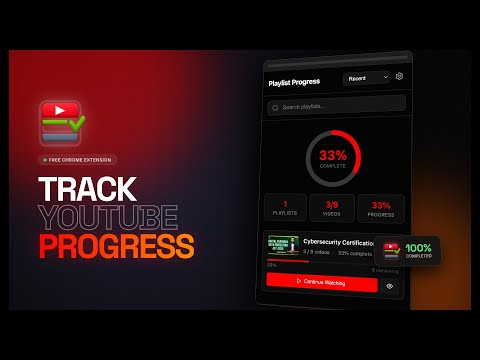
The ultimate learning dashboard. Track playlist completion, manage courses, skip chapters, and celebrate milestones on YouTube.
🚀 THE ULTIMATE LEARNING & BINGE-WATCHING DASHBOARD FOR YOUTUBE Turn YouTube into a powerful learning and productivity platform. If you use YouTube for courses, tutorials, lectures, playlists, podcasts, or long entertainment series, staying organized can be difficult. YouTube Playlist Progress Tracker adds a clean, native-feeling progress system directly into YouTube, so you always know exactly where you stand. 📊 VISUAL PROGRESS TRACKING ● Track Anywhere: View your progress directly on both the playlist sidebar and the main playlist overview page! ● View real-time percentage rings and progress bars. ● Track total watched time vs. remaining time. ● See video counts and completion stats instantly. ⏭️ SKIP & EXCLUDE VIDEOS (UNIQUE FEATURE) Not every video matters. ● Exclude intros, outros, filler, or irrelevant chapters ● Your progress reflects only the content that truly matters ● Restore excluded videos instantly with one click 🏆 MILESTONE MOTIVATION ● Stay inspired throughout your learning journey! ● Celebrate at 25%, 50%, 75%, and 100% completion. ● Beautiful fireworks and confetti animations make finishing playlists addictive. 🎨 BEAUTIFUL & CUSTOMIZABLE ● Automatic Dark and Light mode support. ● 5 Custom accent colors: Red, Blue, Purple, Green, and Orange. ● Compact mode available for smaller screens. ● Refined UI polish for a seamless "native" feel. 🔧 POWERFUL CONTROLS ● NEW: Unwatch Button – Instantly reset progress for any video ● Mark videos or entire sections as Unwatched ● Restore Excluded content with a single click ● Clean overlay with quick-access statistics 🔒 PRIVACY FIRST ● All progress data stays 100% on your device. ● No tracking. No analytics. No external servers. ● Your learning data is your own business. 🎯 PERFECT FOR: ● Students ● Software Engineers ● Lifelong Learners ● Course Watchers ● Tutorial Bingers. 🔊 Smart Music & Radio Support (New in v1.1.0) Now fully supports YouTube Mixes, Stations, and continuous playlists, ensuring accurate tracking even for dynamic and auto-generated content. Perfect for study playlists, focus music, and long-running sessions. 🆕 WHAT’S NEW IN VERSION 1.1.0 ➤ NEW: Playlist Page Support – Progress bars & stats now appear directly on the main playlist overview page ➤ NEW: Unwatch Button – Reset video progress instantly ➤ NEW: Mix & Station Support – Track progress on YouTube Mixes and Stations ➤ Refined UI – Enhanced layout and premium-level polish ➤ Smoother Experience – Optimized animations and faster loading ➤ Improved Stability – Better performance and reliability across YouTube updates
5 out of 54 ratings
Details
- Version1.2.2
- UpdatedMay 13, 2026
- Size918KiB
- Languages55 languages
- DeveloperWebsite
Email
rairishabh281@gmail.com - Non-traderThis developer has not identified itself as a trader. For consumers in the European Union, please note that consumer rights do not apply to contracts between you and this developer.
Privacy

This developer declares that your data is
- Not being sold to third parties, outside of the approved use cases
- Not being used or transferred for purposes that are unrelated to the item's core functionality
- Not being used or transferred to determine creditworthiness or for lending purposes
Support
For help with questions, suggestions, or problems, visit the developer's support site