


Overview
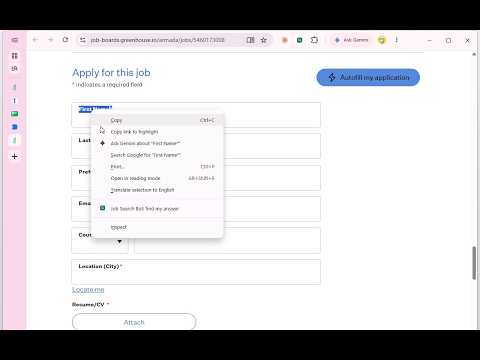
Select a question on an application form, see your saved answer, fill it or copy it. You always click Submit.
JOB SEARCH BOT - ASSISTED APPLY The companion extension for All-in-One customers of Job Search Bot (jobsearchbot.app/sg). When an application form asks a question you have already answered with us, select the question and the extension shows your saved answer. You fill it into the box or copy it, check it, and press Submit yourself. WHO IT IS FOR Job Search Bot is a subscription service for jobseekers in Singapore. Every weekday it searches job boards, scores each role against your resume and emails you a digest. On the All-in-One plan, this extension helps with the repetitive part of applying: typing the same name, phone number, notice period, salary and work-authorisation answers into form after form. You need an All-in-One subscription and the install code from your invite email. Without an install code the extension does nothing. Plans and prices: jobsearchbot.app/sg HOW IT WORKS 1. Link your browser. Click the extension icon and enter the install code from your invite email. 2. Open the application page of a job, on any job site. 3. Select the text of a question on the page, right-click it and choose "Job Search Bot: find my answer". 4. Chrome's side panel opens with your saved answer. It is matched on your own device from the answers you gave us. 5. Press "Fill into the box" to put the answer into the box that follows the question, or to choose the matching option in a dropdown list, or press "Copy" and paste it yourself. 6. Check it, then press the site's own Submit button. In the extension icon you can mark a job as applied, or as needing manual work with a short note, and your Google Sheet is updated. WORKS ON ANY JOB SITE It works on the application page of any job site, because it acts only on the page you have open and the text you select. It is tested on LinkedIn, JobStreet and Indeed so far, and it has also filled the name and email boxes of a company's own career-site form. A question it has no answer for is left for you, and some question types, such as lists of tick boxes and custom search lists (for example some Country boxes), you may need to answer yourself. WHAT IT CAN ANSWER From your sign-up form and profile: first, last and full name, email, phone number (with its country code), LinkedIn, GitHub and website addresses, location, country, citizenship, notice period, expected monthly salary, work authorisation and sponsorship status, willingness to relocate, onsite preference, years of experience and education level. YOU STAY IN CONTROL - It never presses Submit. You send every application yourself. - It does nothing until you select text and use it. It does not run on any page by itself and does not watch what you browse. - It writes into a box, or chooses an option in a dropdown, only when you press "Fill into the box". For a custom dropdown it opens that list and clicks the one matching option, and never a Submit, Next or other button. - It never reads or stores your LinkedIn or other passwords. - It talks only to Job Search Bot's own server. The text you select is matched on your device and is not sent to us. We never receive the page, its questions or what is on your screen. YOUR DATA The extension receives your saved answers and your Apply list from our server. It sends us only: the install code you enter once, the extension's version number, and, for each job you finish or flag, the job's row in your Sheet, its web address, the job board, whether you applied or it needs manual work, and any short note you type. It keeps a token in your browser that links it to your account; uninstalling the extension erases it. We do not sell your data and we do not use it for advertising. Full details: https://jobsearchbot.app/sg/privacy (section 10). GOOD TO KNOW - Daily limits apply. If you reach one, the extension tells you, and you can mark the rest by hand tomorrow. - If your plan is not active or does not include assisted apply, the extension says so and stops. - This is an early-access release. Some questions may not be recognised, and job sites can change their forms at any time. Anything the extension does not recognise is left for you. - Job sites have their own terms. You use the extension on your own accounts, and you are responsible for the applications you send. SUPPORT Email job.search.bot.svc@gmail.com. Website: https://jobsearchbot.app/sg/ LinkedIn is a trademark of LinkedIn Corporation. Job Search Bot is not affiliated with or endorsed by LinkedIn or any other job site named here.
0 out of 5No ratings
Details
- Version0.1.5
- UpdatedNovember 25, 2026
- Size39.78KiB
- LanguagesEnglish
- DeveloperWebsite
Email
job.search.bot.svc@gmail.com - Non-traderThis developer has not identified itself as a trader. For consumers in the European Union, please note that consumer rights do not apply to contracts between you and this developer.
Privacy

Job Search Bot - Assisted Apply has disclosed the following information regarding the collection and usage of your data. More detailed information can be found in the developer's privacy policy.
Job Search Bot - Assisted Apply handles the following:
This developer declares that your data is
- Not being sold to third parties, outside of the approved use cases
- Not being used or transferred for purposes that are unrelated to the item's core functionality
- Not being used or transferred to determine creditworthiness or for lending purposes
Support
For help with questions, suggestions, or problems, visit the developer's support site