

Jazmine AI – ChatGPT Sidebar with Prompt Library Manager

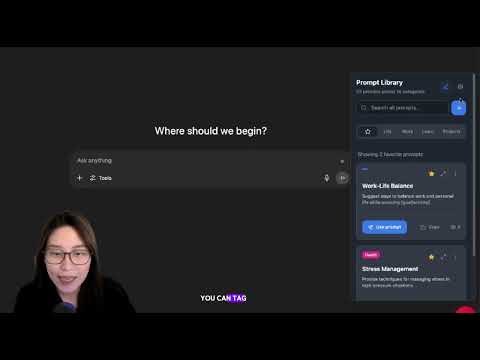
Overview
Save, organize, and reuse your favorite AI prompts in a smart ChatGPT sidebar. Boost your productivity with Jazmine AI.
Jazmine AI is a sleek ChatGPT sidebar that lets you save, organize, and reuse your favorite prompts — perfect for creators, founders, and productivity geeks who use AI daily. No more digging through Notion or scattered documents. With Jazmine, your best prompts live right where you work: in a sidebar that follows you across tabs, ready to deploy at any moment. ✅ Key Features: 💬 ChatGPT Sidebar powered by GPT-4o (Claude, DeepSeek, and more coming soon) 📌 Save and tag your favorite prompts as you work 🗂 Organize prompts into custom categories ⚡ Instantly insert prompts into ChatGPT or your own AI workflows 🔄 Stay in flow with a smart, minimal UI that doesn’t get in the way Whether you're crafting content, writing code, doing research, or managing your business — Jazmine AI helps you think, work, and create faster with AI. 🔒 100% Private & Secure Your prompt library is stored locally on your browser — no cloud sync, no servers, no tracking. ✅ Perfect for: 🧠 Power ChatGPT users 📈 Marketers & solopreneurs 🖋️ Writers & content creators 🧑💻 Developers & product builders 🎓 Students & researchers Ready to upgrade how you use AI? Install Jazmine AI and start building your ultimate prompt library.
5 out of 527 ratings
Details
- Version1.0.49
- UpdatedFebruary 28, 2026
- Size329KiB
- LanguagesEnglish
- DeveloperWebsite
Email
ceo@marcdomancie.com - Non-traderThis developer has not identified itself as a trader. For consumers in the European Union, please note that consumer rights do not apply to contracts between you and this developer.
Privacy

This developer declares that your data is
- Not being sold to third parties, outside of the approved use cases
- Not being used or transferred for purposes that are unrelated to the item's core functionality
- Not being used or transferred to determine creditworthiness or for lending purposes
Support
For help with questions, suggestions, or problems, please open this page on your desktop browser