

JASON (JSON Manager)
1 rating
)
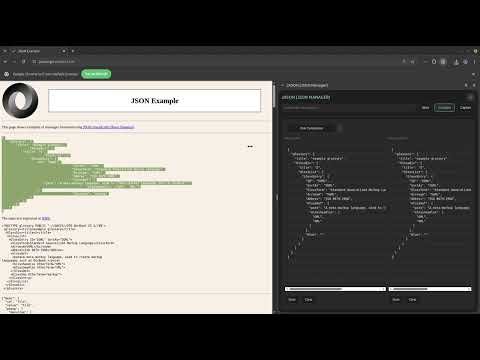
Overview
Quick sidebar for saving and managing JSON snippets
JASON (JSON Manager) is a local-first JSON workspace that lives in your browser sidebar and is built for developers, QA, API testers, and technical users who work with JSON all day. **What is it** A focused side-panel tool for: - Collecting JSON-like payloads from active pages, - Storing and organizing snippets in tabs, - Validating/formatting/minifying content, - Comparing two payloads with visual diff guidance. **How you use it** Three core modes: - Store: - tabbed JSON workspace (edit, search, fold, format, save, download). - Compare: - two JSON fields side by side, run comparison, inspect line/word-level diffs, and confirm perfect matches. - Capture: - run scan on current tab, review results, store or compare selected captures. **Why** - Reduces context switching between devtools, editors, and scratchpads. - Keeps JSON workflows in one persistent place. - Improves review speed with inline compare visuals and searchable content. **UI/UX** - Local persistence with fast reopen behavior. - Light/dark theme support. - Real-time size/validation feedback. - Search across workspace content and capture content. - Scan flow includes user feedback and retry behavior for common tab-readiness timing cases. **Privacy and architecture** - No analytics, no third-party telemetry, no external data transmission. - Data stays in browser local storage. - Plain JS architecture with shared source + browser-specific manifests/background scripts. - Deterministic build pipeline with manifest sync checks.
5 out of 51 rating
Details
- Version1.2.0
- UpdatedApril 13, 2026
- Offered byStefanoStem
- Size57.44KiB
- LanguagesEnglish
- Developer
Email
stem.test.1992@gmail.com - Non-traderThis developer has not identified itself as a trader. For consumers in the European Union, please note that consumer rights do not apply to contracts between you and this developer.
Privacy

This developer declares that your data is
- Not being sold to third parties, outside of the approved use cases
- Not being used or transferred for purposes that are unrelated to the item's core functionality
- Not being used or transferred to determine creditworthiness or for lending purposes